Language: English | 中文
Stable, protocol-first home of think-tank: a cross-platform high-level Skill for research, review, council, and strategy workflows on a verified Codex-first runtime path.
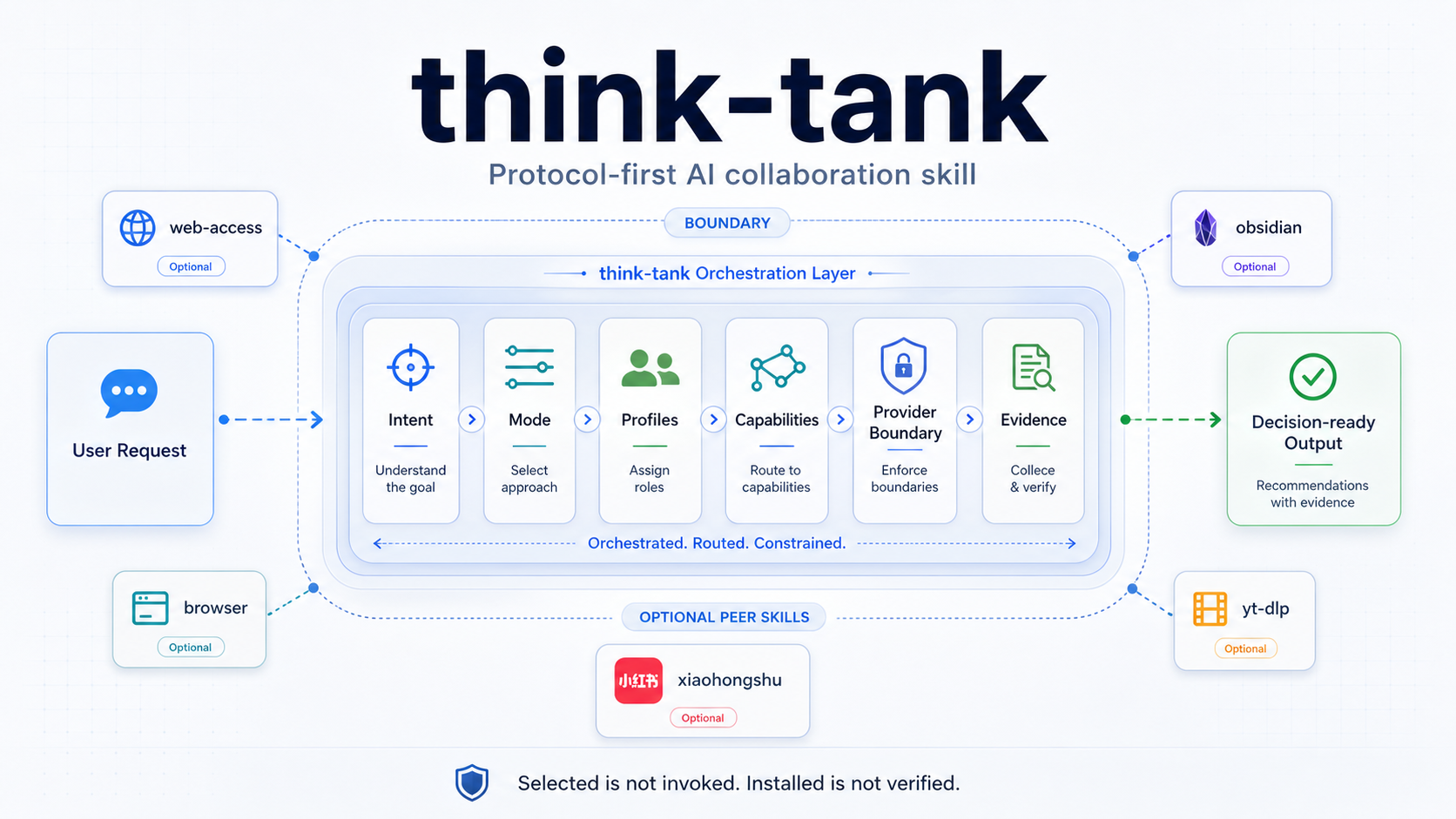
The high-level Skill lives in think-tank/.
The leader orchestration layer is being split into a standalone sibling project on the Desktop.
- One protocol surface for research, review, council, and strategy work.
- A clear split between orchestration and tools:
think-tank = task understanding + role organization + capability routing + evidence synthesis + boundary declaration. - Explicit evidence states:
verified,verified_partial,planned,blocked. - Public release gates that check protocol integrity, privacy boundaries, package scope, and stable posture.
- Pick your install path:
- Codex install:
python3 "$HOME/.codex/skills/.system/skill-installer/scripts/install-skill-from-github.py" --repo yangKJ/think-tank-skill --path think-tank- Manual install:
think-tank/
Copy it into your platform's skill directory, or clone this repository and reference think-tank/ directly.
- Restart your agent runtime after installation.
For Codex, restart the app or session so the new skill can be discovered.
- Run the first-install check:
test -f "$HOME/.codex/skills/think-tank/SKILL.md" && echo "think-tank installed"- Try one of the public templates:
think-tank/examples/public/research-request.md
think-tank/examples/public/council-decision.md
think-tank/examples/public/review-acceptance.md
think-tank/examples/public/research-to-action.md
think-tank/examples/public/strategy-backlog.md
- Read
think-tank/README.mdandthink-tank/docs/open-source-quickstart.mdfor the protocol surface and runtime boundaries.
Continue with the user-operation path:
think-tank/docs/first-run-guide.mdthink-tank/docs/operator-manual.mdthink-tank/docs/cookbook.mdthink-tank/docs/progression-guide.md
- Run the public release gate:
python3 checks/open_source_release_suite.py- Run the stable gate:
python3 checks/stable_release_check.pyIf both pass, you are on the repository's current stable public path.
What you get immediately after installing think-tank:
- protocol-first research, review, council, and strategy workflows
- mode selection, profile simulation, and structured output
- local file analysis and user-provided material analysis
- explicit boundary declaration through evidence states
What you should not expect from a fresh install:
- every optional peer skill to be present automatically
- browser, social, media, or knowledge-base providers to be pre-authorized
- full multi-agent runtime parity across platforms
- "installed" to mean "already invoked and verified"
| Platform | Install target | Post-install action |
|---|---|---|
| Codex | ~/.codex/skills/think-tank |
Restart Codex or the current session |
| Claude Code | ~/.claude/skills/think-tank/ |
Restart Claude Code session |
| Other runtimes | Your runtime's skill directory | Re-index or restart that runtime |
Use this shortest path when validating a first install:
- Confirm the entry file exists.
- Restart the runtime.
- Send a small prompt that should trigger research, review, or strategy behavior.
- Check that the response uses
think-tankstyle boundary-aware structure rather than generic freeform output.
Minimal file check for Codex:
test -f "$HOME/.codex/skills/think-tank/SKILL.md" && echo "think-tank installed"Suggested first prompt:
Use think-tank to review these notes, separate facts from assumptions, and give me a boundary-aware recommendation.
- If the install script fails with HTTPS certificate errors, use a manual
git cloneor zip download path and copy onlythink-tank/. - If the destination already exists, remove or rename the old
~/.codex/skills/think-tankdirectory before reinstalling. - If the runtime does not recognize the skill, restart the app or session before debugging deeper.
- Do not copy
.think-tank/,.codex/,.claude/, or generated output folders into the public skill directory.
| Research | Council | Review |
|---|---|---|
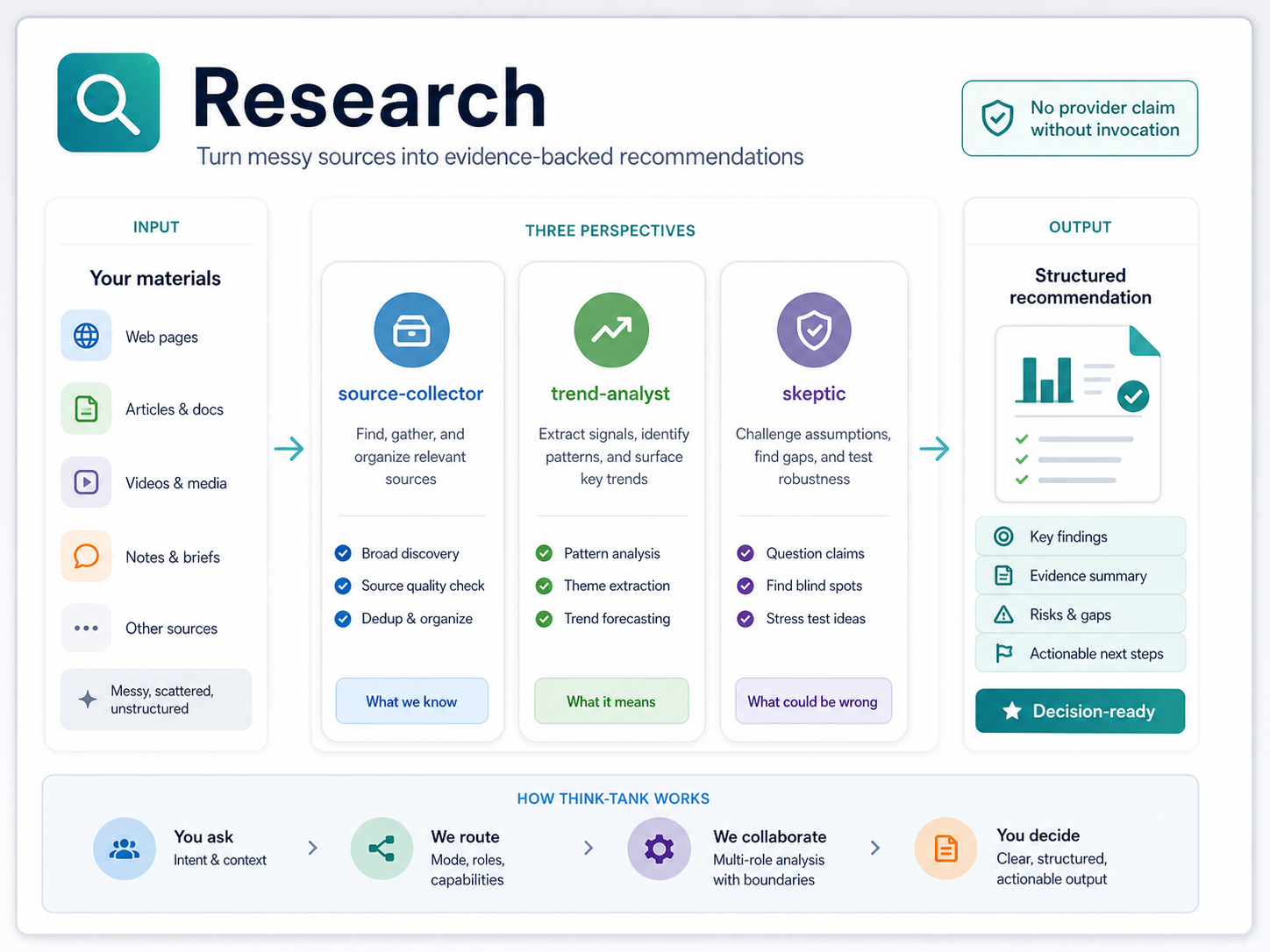 |
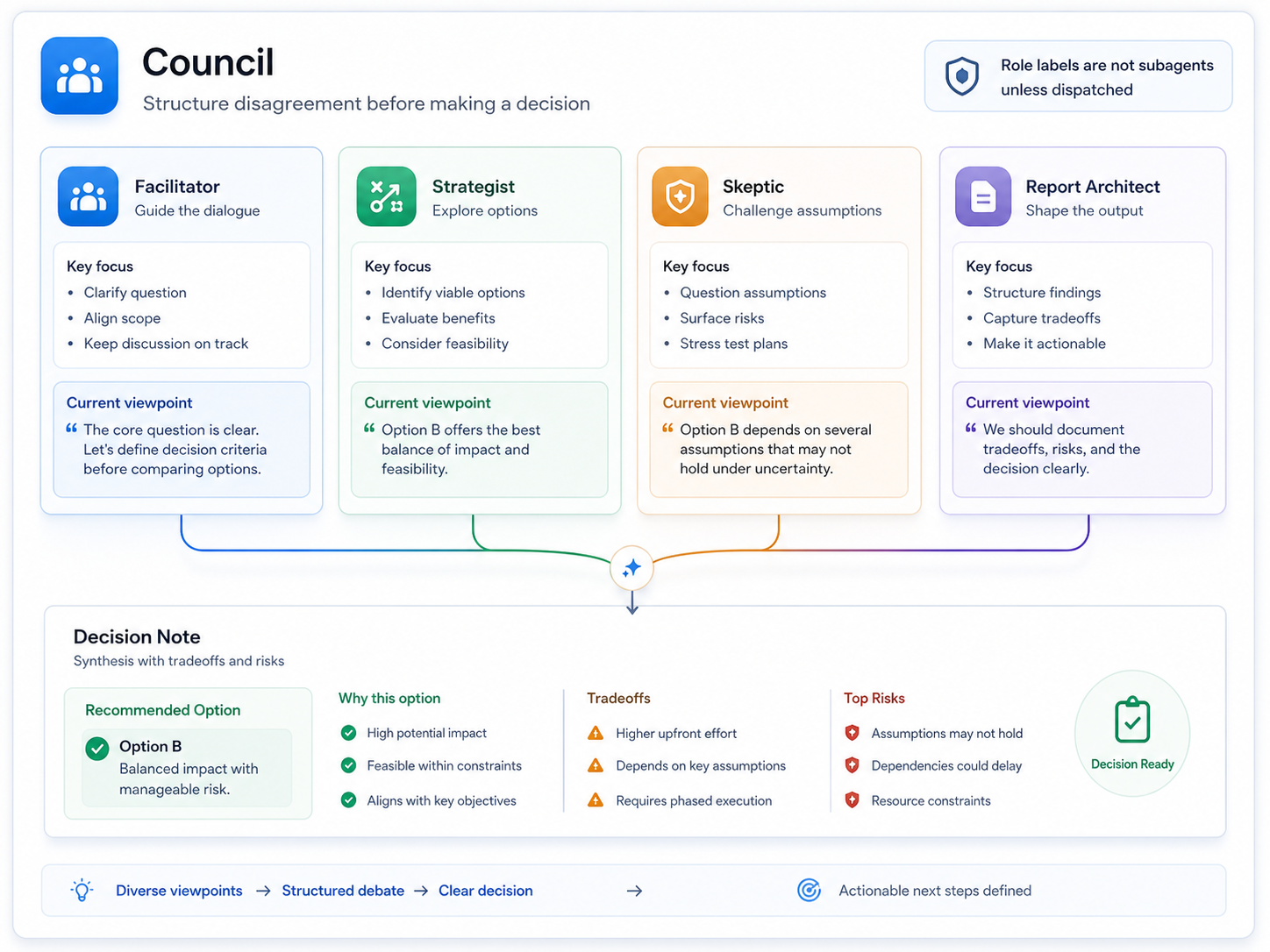 |
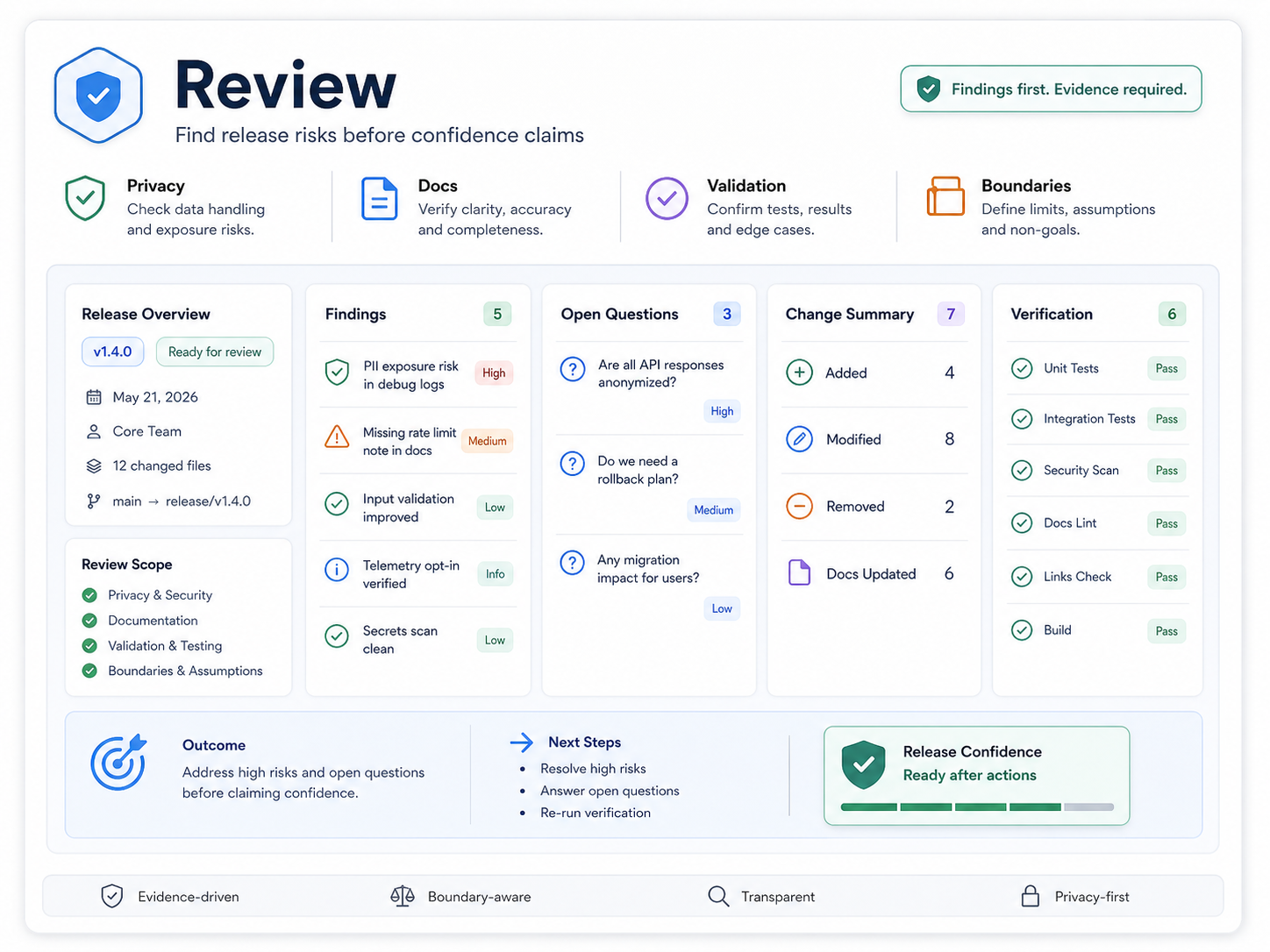 |
think-tank does not bundle concrete tools. It documents provider integration patterns and routes capability slots to optional peer skills only when the current platform exposes them and the task has permission to use them.
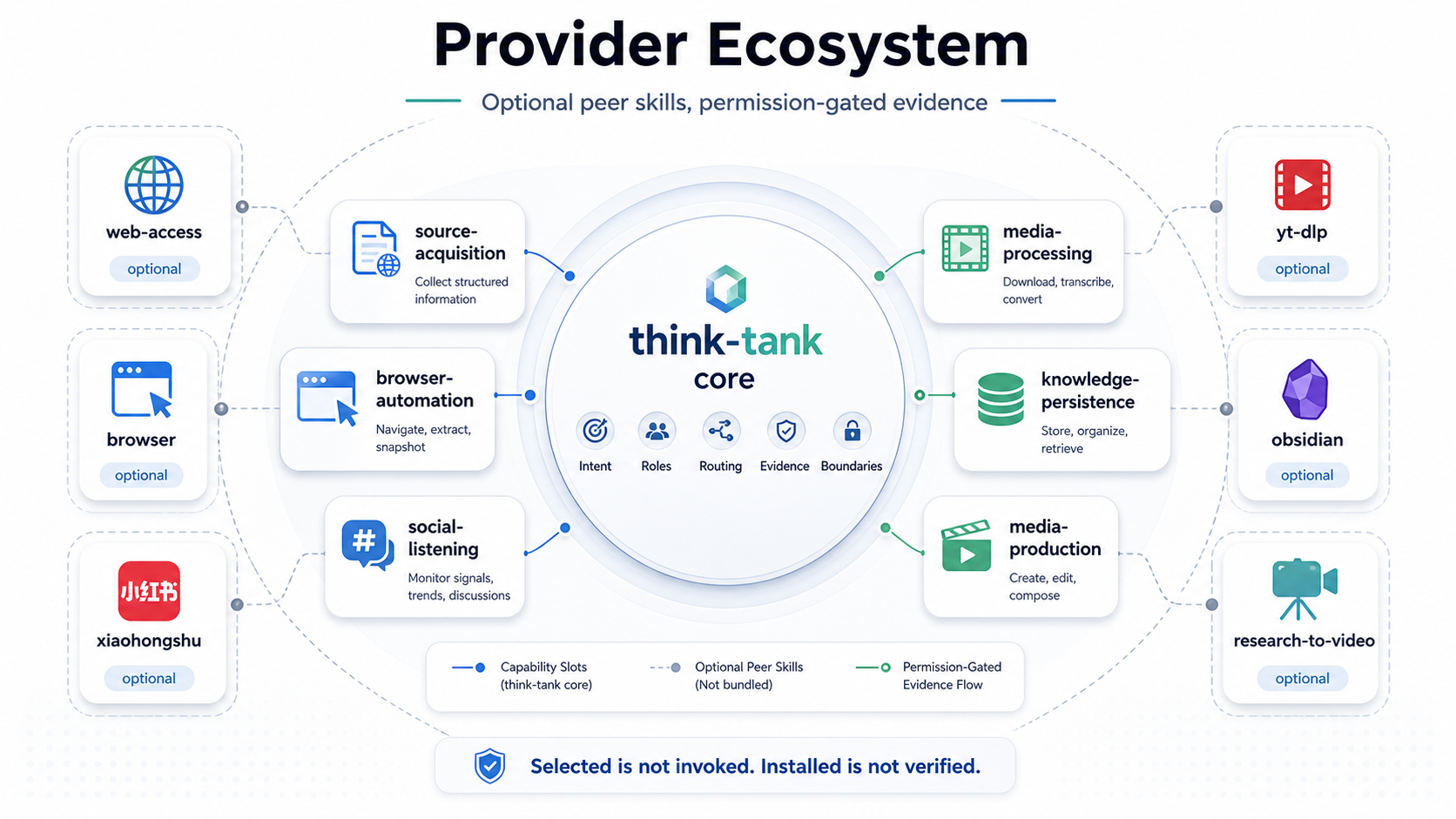
Representative peer skill pattern examples:
| capability slot | example peer skills | status boundary |
|---|---|---|
| source-acquisition | web-access, agent-reach |
pattern documented, evidence required |
| browser-automation | browser, playwright-cli |
verified_partial for readonly paths |
| social-listening | xiaohongshu |
pattern documented, login and permission required |
| media-processing | yt-dlp, openai-whisper |
pattern documented, rights and permission required |
| knowledge-persistence | obsidian |
pattern documented, private write confirmation required |
| media-production | research-to-video-production |
verified_partial, scoped production workflow |
See think-tank/docs/provider-ecosystem-examples.md and think-tank/docs/provider-integration-patterns.md.
The Research OS + Memory Runtime layer helps repeatable research work produce run records, memory candidates, provider ledgers, handoffs, guardrails, and eval fixtures.
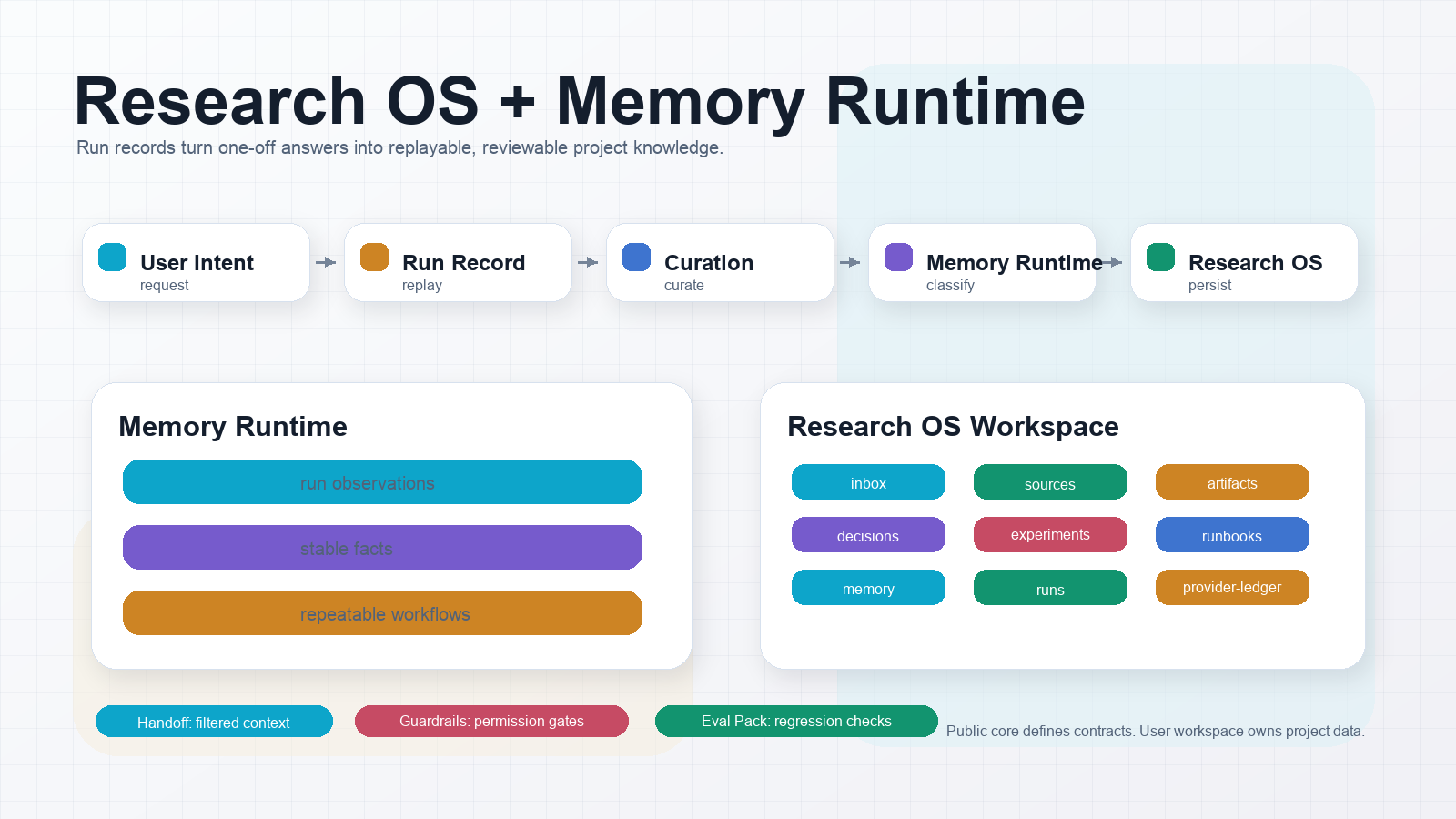
- Run Record:
think-tank/protocol/run-record.md - Project Memory Runtime:
think-tank/protocol/project-memory-runtime.md - Provider Invocation Ledger:
think-tank/protocol/provider-invocation-ledger.md - Handoff Protocol:
think-tank/protocol/handoff-protocol.md - Guardrails:
think-tank/protocol/guardrails.md - Research OS:
think-tank/protocol/research-os.md - Eval Pack:
think-tank/protocol/eval-pack.md
- Contributor docs:
CONTRIBUTING.md,SECURITY.md,CODE_OF_CONDUCT.md,SUPPORT.md, issue templates, and PR template. - Research OS Starter Kit:
starter-kits/research-workspace/. - Eval Pack Starter:
evals/. - Provider Test Matrix:
think-tank/docs/provider-test-matrix.md. - Docs Site:
think-tank/docs/index.md, concepts, guides, reference, and release sections. - Platform Distribution:
think-tank/docs/platform-publishing.md,think-tank/docs/codex-installation.md, andthink-tank/docs/claude-code-installation.md.
The Skill Experience Layer helps agents decide when to use
think-tank, form a clear invocation contract, load references progressively,
compose optional peer skills safely, and self-test common boundaries.
Trigger words are not built into the public core. They belong in user-owned YAML
policy; think-tank documents intent categories and routing contracts.
- Skill Trigger Intelligence:
think-tank/protocol/skill-trigger-intelligence.md - Skill Invocation Contract:
think-tank/protocol/skill-invocation-contract.md - Progressive Disclosure:
think-tank/protocol/progressive-disclosure.md - Agent Compatibility Matrix:
think-tank/docs/agent-compatibility-matrix.md - Skill Composition Guide:
think-tank/docs/skill-composition-guide.md - Skill Quality Score:
think-tank/docs/skill-quality-score.md - Skill Experience Examples:
think-tank/examples/v3/ - Skill Self Tests:
self-tests/
Version history lives in CHANGELOG.md.
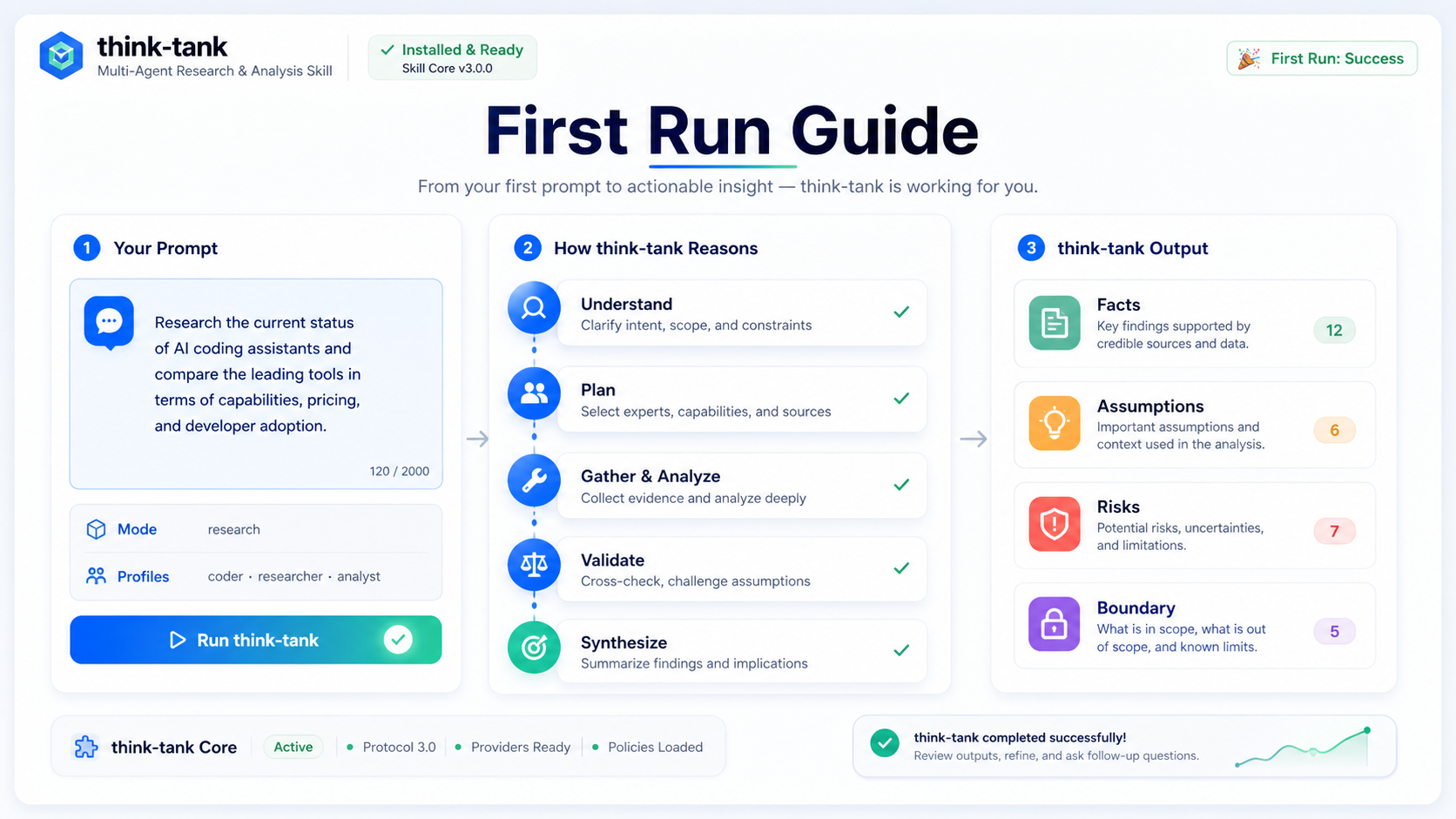
- First Run Guide:
think-tank/docs/first-run-guide.md - Operator Manual:
think-tank/docs/operator-manual.md - Cookbook:
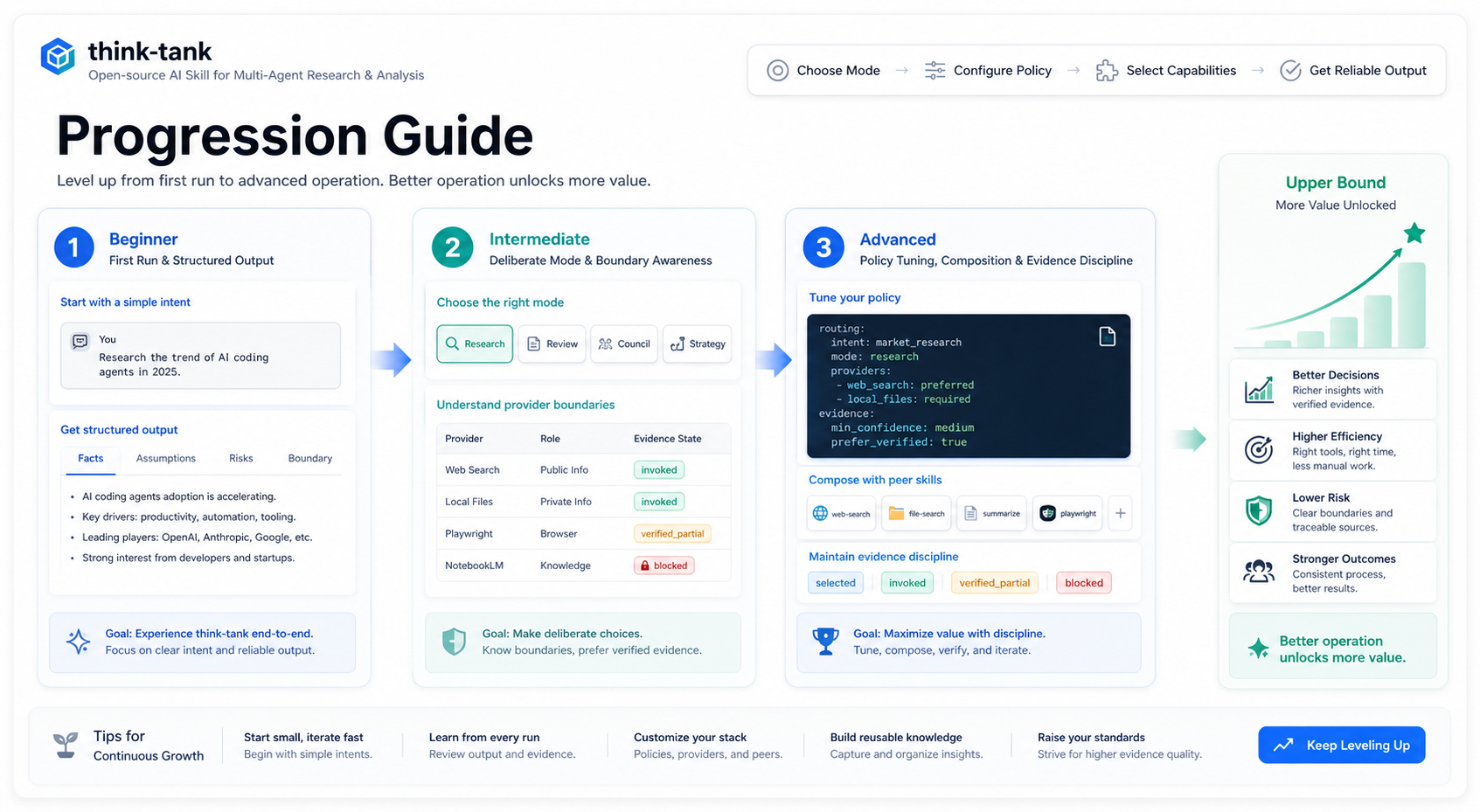
think-tank/docs/cookbook.md - Progression Guide:
think-tank/docs/progression-guide.md
| First Run Guide | Progression Guide |
|---|---|
 |
 |
| Cookbook | Operator Manual |
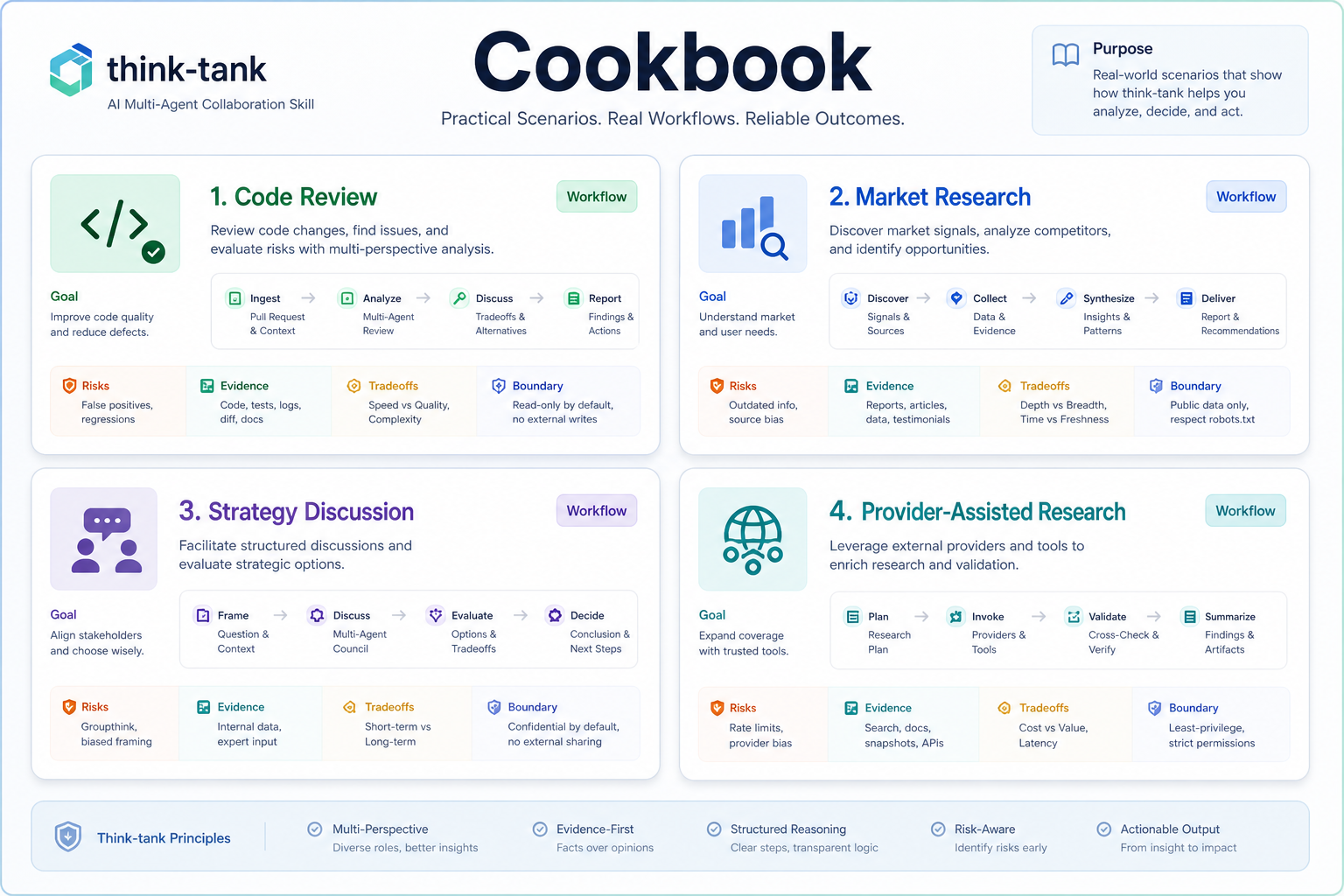 |
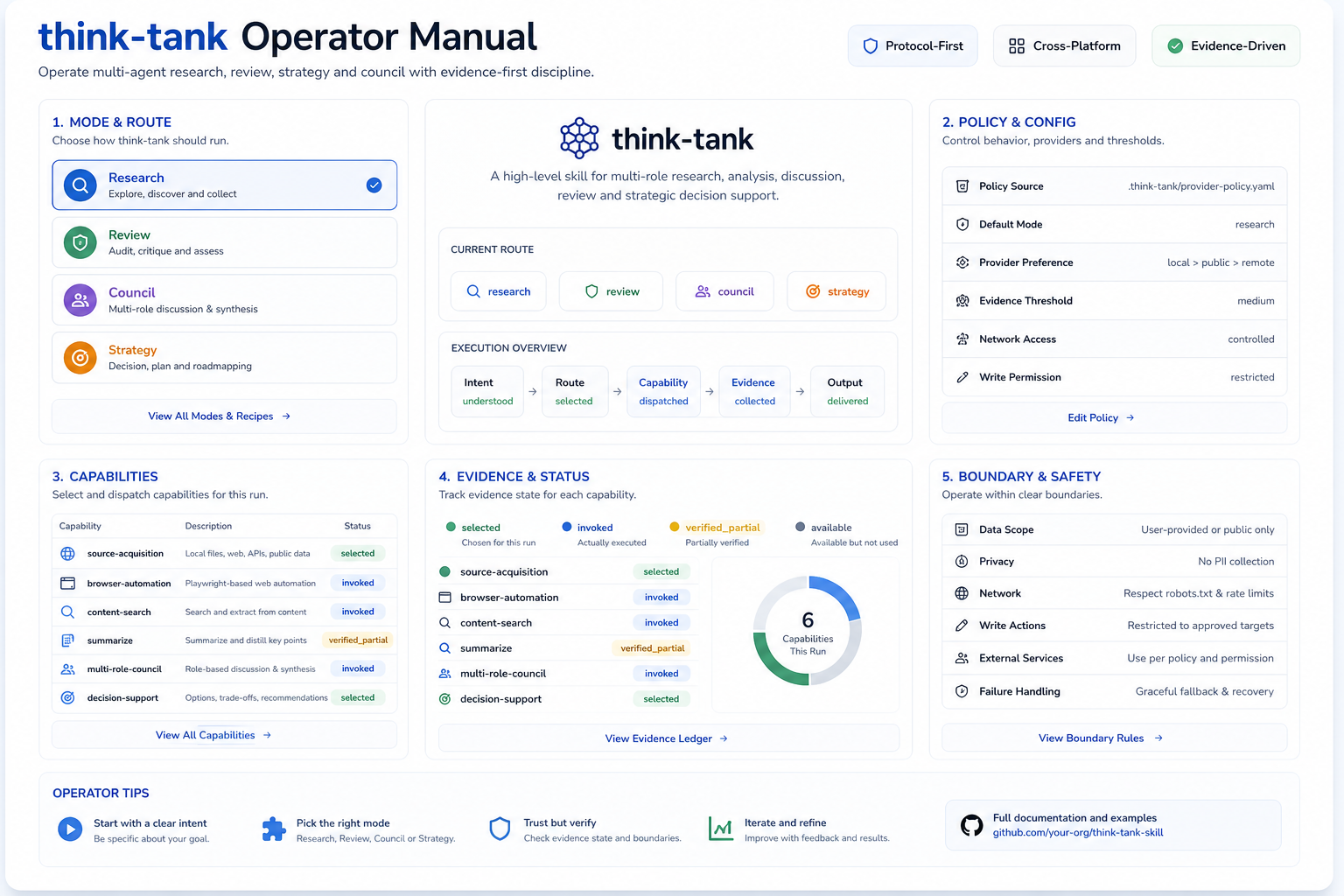 |
think-tank-skill/
├── README.md
├── LICENSE
├── .gitignore
├── think-tank/
│   ├── SKILL.md
│   ├── README.md
│   ├── protocol/
│   ├── capabilities/
│   ├── profiles/
│   ├── platforms/
│   ├── modes/
│   ├── templates/
│   ├── runtime/
│   ├── domain-packs/
│   ├── docs/
│   └── examples/
├── starter-kits/
│   └── research-workspace/
├── evals/
└── self-tests/
think-tank/SKILL.md: Skill entrypoint.think-tank/protocol/: Platform-independent protocol source of truth.think-tank/capabilities/: Capability slots for external skills and tools.think-tank/profiles/: Cross-platform role profiles.think-tank/platforms/: Claude Code, Codex, and future platform adapters.think-tank/modes/: Research, council, review, and strategy modes.think-tank/runtime/: Platform-neutral minimal runtime primitives.think-tank/templates/: Cross-platform report and kickoff templates.think-tank/domain-packs/: Optional domain packs.think-tank/schemas/: Machine-readable input and output schemas.think-tank/examples/: Reusable examples that demonstrate the protocol.starter-kits/research-workspace/: Project-local Research OS starter kit.evals/: Public protocol eval fixtures.self-tests/: Public skill experience self-test fixtures.
Public release posture:
release_posture: stable_release
target_users:
  - Codex-first teams with explicit capability boundaries
  - protocol-first contributors and integrators
  - teams willing to work with explicit capability boundaries
not_target_users:
  - users expecting every optional provider to work out of the box
  - users expecting full multi-agent runtime across platforms
This repository is ready to be shared publicly as a stable protocol-first release with explicit capability boundaries. It is not an "install once and every provider just works" distribution.
- Stable protocol surface in
think-tank/ - Stable Codex-first default path
- Stable public release gates
- Stable evidence-based capability claims
- Every optional provider works by default
- Cross-platform runtime parity is complete
- External login flows, social scraping, or private knowledge-base writes are default capabilities
- Every installed peer skill is automatically invoked and recovered
| area | status | source |
|---|---|---|
| Codex foundation | verified | think-tank/docs/codex-readiness-matrix.md |
| Provider invocation proofs | 4 public proofs | think-tank/examples/stable-release-readiness.yaml |
| External browser readonly | verified_partial | think-tank/examples/codex-browser-external-readonly.md |
| Beyond-readonly subagent runtime | verified_partial | think-tank/examples/codex-subagent-lifecycle-validation.md |
| Long-running subagent lifecycle | verified_partial | think-tank/docs/stable-readiness-matrix.md |
| Claude Code runtime | deferred | think-tank/docs/support-matrix.md |
- Teams expecting zero-configuration access to every optional provider
- Users who do not want explicit runtime and evidence boundaries
- Users who need default support for external login automation or private knowledge-base writes
- Users who need full cross-platform multi-agent parity today
Creator media, comic-drama, TTS, image-production, and video-production resources have moved to a separate closed production repository.
This repository now keeps only the public, reusable think-tank/ core and non-project-specific governance. Do not add self-media, comic-drama episode assets, generated videos, local TTS runs, or creator production queues back into think-tank-skill.
think-tank is a higher-level Skill and protocol system. It is designed to be used by Claude Code, Codex, other local projects, and future users without being tied to one runtime or one private project.
It is not:
- A platform-specific script wrapper
- A private prompt collection
- A child module of a research agent
- A renamed agent-council implementation
It is:
- The primary Skill
- The primary protocol source
- A reusable cross-platform capability framework
- A place to consolidate research, council, review, and strategy workflows
think-tank/protocol/think-tank-protocol.md: Core workflow.think-tank/protocol/roles.md: Role selection and responsibilities.think-tank/protocol/agent-selection.md: Scenario-driven agent selection.think-tank/protocol/mode-selection.md: Mode selection rules.think-tank/protocol/quality-gates.md: Quality gates.think-tank/protocol/artifact-quality-gates.md: Artifact and media production quality gates.think-tank/protocol/versioning.md: Protocol versioning.
- Start here:
think-tank/docs/provider-ecosystem-examples.mdthink-tank/docs/provider-integration-patterns.mdthink-tank/docs/codex-installation.mdthink-tank/docs/claude-code-installation.mdthink-tank/docs/platform-publishing.mdthink-tank/docs/index.mdthink-tank/docs/faq.mdthink-tank/docs/troubleshooting.md- Stable release references:
- Codex runtime references:
- Protocol and governance references:
public-release-manifest.yamlthink-tank/docs/history.mdthink-tank/protocol/local-workspace.mdthink-tank/protocol/memory-curation.mdthink-tank/protocol/capability-evidence-state-machine.mdthink-tank/protocol/memory-promotion-policy.mdthink-tank/protocol/runtime-provenance.mdthink-tank/protocol/natural-language-runtime-orchestration.md
Validation is performed locally. Public protocol changes should still be reviewed against the relevant protocol, schema, template, and README files before release.
Release gate commands:
python3 checks/open_source_release_suite.py
python3 checks/protocol_check.py
python3 checks/codex_validation_check.py
python3 checks/schema_sample_check.py
python3 checks/minimal_runtime_execution_check.py
python3 checks/release_privacy_check.py
python3 checks/open_source_release_check.py
Stable gate:
python3 checks/stable_release_check.pyGenerate platform distribution artifacts:
python3 scripts/package_agent_distributions.pyVersion history and release packaging references:
CHANGELOG.md
think-tank/docs/release-tagging.md
The protocol layer defines what think-tank means. Platform adapters define how think-tank runs in a specific environment. Modes define scenario defaults.
Platform-specific behavior must not redefine the core protocol.
leader-runtime is intentionally separate. It defines how a Codex-style main agent becomes a leader that can orchestrate expert pools and acceptance governance. think-tank/ remains a reusable Skill core, not the entire leader operating layer.