
Unity-SpriteAssist is an Unity extension that assist Sprite's mesh creation more conveniently.
Unity 2021.3 LTS or later versions
- Control Vertex Easily with a Sliderbar.
- Make a transparent, opaque, complex(transparent + opaque) mesh
- Convert Sprite to MeshRenderer Prefab




You can add https://github.com/sr4dev/Unity-SpriteAssist.git?path=Assets/SpriteAssist to Package Manager.

https://openupm.com/packages/com.sr4dev.unity-spriteassist/
openupm add com.sr4dev.unity-spriteassist
Clone or download this repository and copy Assets/SpriteAssist folder to your Unity project.
- Select a Sprite asset in the Project window.
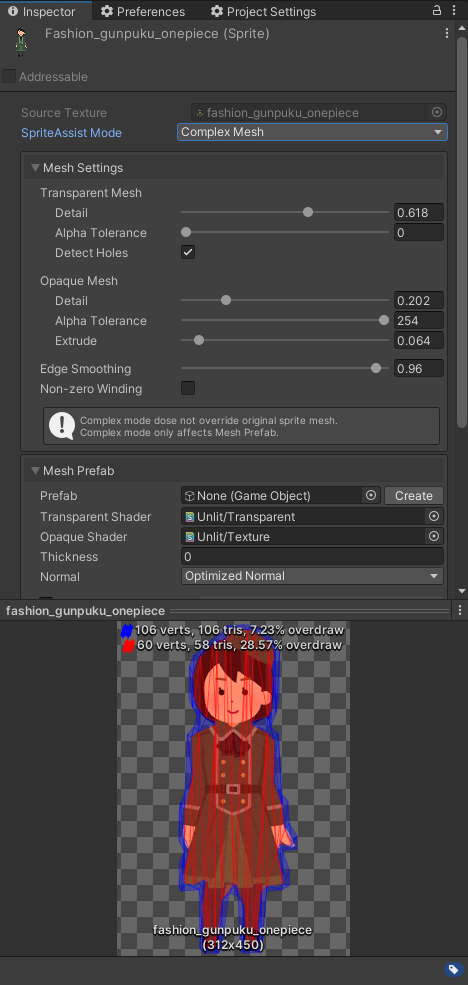
- Select a Mode and adjust parameters.

- Transparent Mesh: Default Mode. Allow alpha pixel.
- Opaque Mesh: Disallow alpha pixel. You can use the mesh for opaque shader.
- Complex: Separate area by alpha.
- Alpha pixel is converted to Transparent Mesh area.
- Non-alpha pixel is converted to Opaque Mesh area.
- To Use Complex mode must be created Mesh Prefab.
- Complex mode dose not override original Sprite mesh.

- Detail: Density and accuracy of the mesh to the Sprite outline.
- Alpha Tolerance: Threshold for transparency considered when generating the outline.
- Detect Holes: Detect holes from outline.
- Edge Smoothing: Smoothing sharp edges.
- Non-zero Winding: Use Non-zero winding rule. Default Winding rule is even-odd.
Even-odd(left), Non-zero(right)

Wikipedia: Non-zero winding

- Prefab: Linked Prefab with Sprite.
- Create/Remove: Create or remove a Prefab.
- Default Transparent Shader
- Default Opaque Shader
Since v1.3.0, SpriteAssist supports iShapeTriangulation as an alternative triangulation library. You can select the default library in Project Settings.
LibTessDotNet is the stable and lightweight default option. iShapeTriangulation can generate meshes with the same vertex count but fewer thin, elongated triangles, though it is heavier and may fall back to LibTessDotNet automatically when triangulation fails.
By default, the selected triangulation library also applies to Unity Default modes. Disable Apply To Unity Default in Project Settings if you want Unity Default modes to keep Unity's native sprite geometry. Existing sprites need a manual reimport (or Reimport All) after changing this option.

LibTessDotNet

iShapeTriangulation

This extension uses AssetImporter.userData of Texture asset. If your project already uses userData, it will be overridden.
Unity Document: AssetImporter.userData
- Does not support SpriteAtlas.
- Does not support PSD file.
For other issues, please refer to the link. https://github.com/sr4dev/Unity-SpriteAssist/issues
- Support pre-packed Sprite.
- Support Sprite Mode: Multiple.
- Add Sprite Animation example.
- Add tutorial(pdf, movies...).
- Release to the Asset Store.
MIT License
- Triangulation: LibTessDotNet v1.1.13, iShapeTriangulation v0.0.8
- Polygon Clipping: Clipper v6.4.2