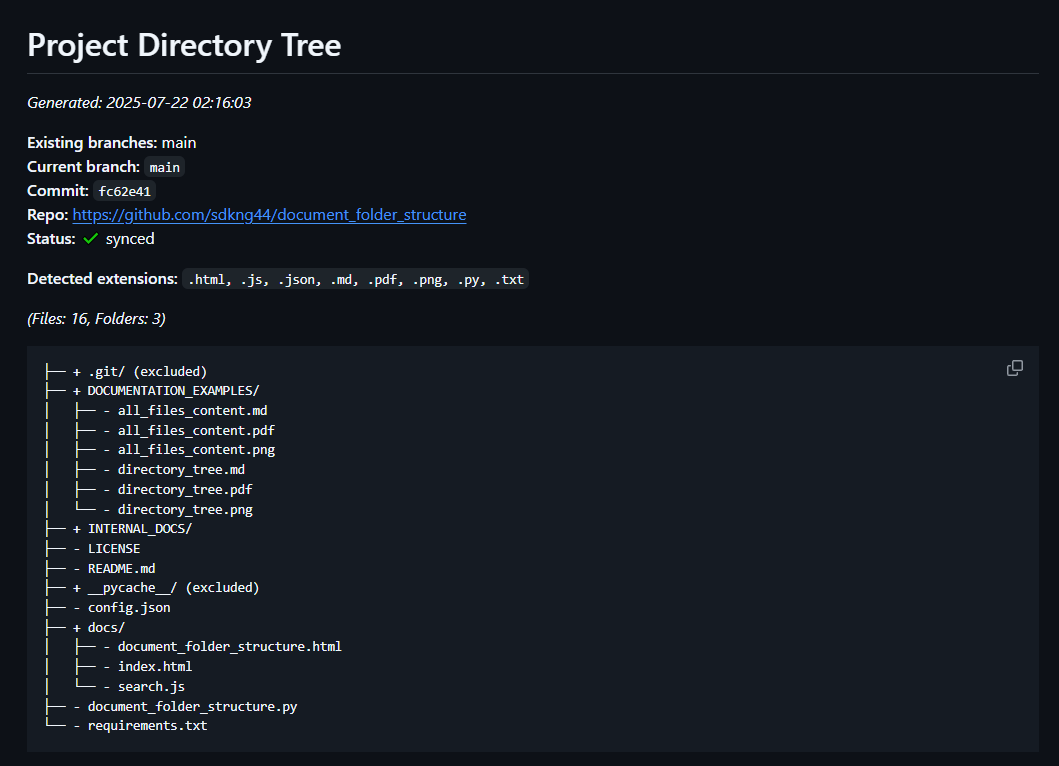
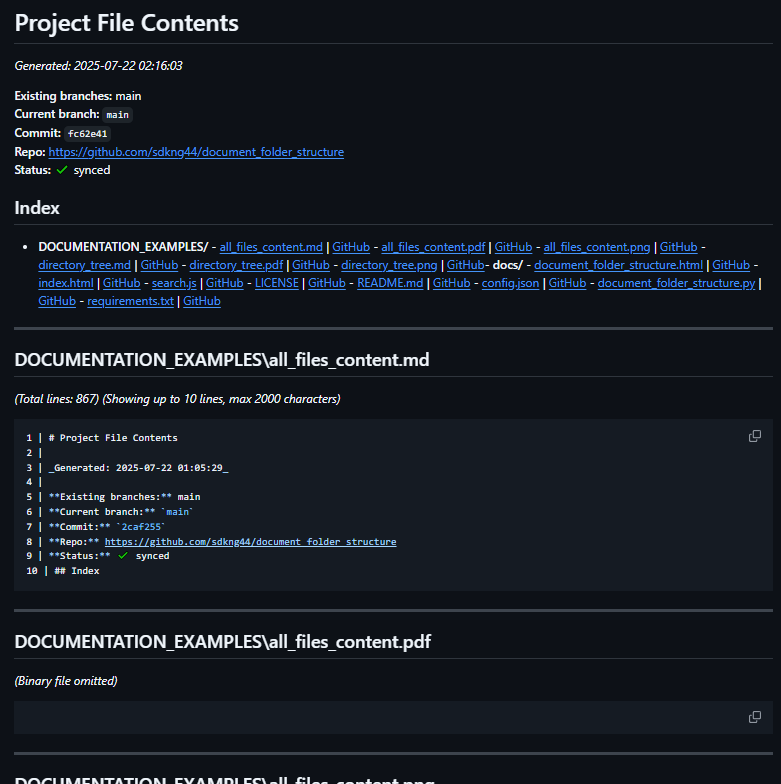
This script generates 2 files (directory_tree.md and all_files_content.md) of structured Markdown documentation for any project directory:
- directory_tree.md: Directory structure with Git metadata (branch, commit, repo, etc.)
- all_files_content.md: Grouped file index and content previews (with truncation for large files, CSV/Excel previews, and special handling for binaries and logs)
- Skips configured folders/files (see configuration)
- Automatically adds the documentation folder to
.gitignore - Supports GitHub/GitLab links to each file at current commit (if Git is configured)
pip install document-folder-structure- 1. Clone the repo:
git clone https://github.com/sdkng44/document-folder-structure.git
cd document-folder-structure- 2. Install dependencies:
pip install -r requirements.txtOnce installed, run from any folder providing the full path to the project you want to document as an argument:
document-folder-structure C:\path\to\myprojector in Linux:
document-folder-structure /path/to/your/projectAlways run from the root of the cloned repo (where the document_folder_structure/ folder is).
python -m document_folder_structure C:\path\to\myprojector in Linux:
python -m document_folder_structure /path/to/your/projectThe documentation files will be created inside the INTERNAL_DOCS/ folder within the target project directory you specified.
Optional arguments:
--config Path to JSON configuration file (default: config.json)
--max-depth Maximum directory depth to display (default: 4)
--tree-title Custom title for the directory tree Markdown
--truncate-lines Max lines for README/large files (default: 10)
--truncate-chars Max characters for file previews (default: 2000)
--max-log-lines Max lines to preview for .log files (default: 10)
--max-preview-columns Max columns to preview in CSV/Excel tables (default: 20)
--no-lines Turn off line numeration on Markdown file content preview (default show line numeration)
Example with arguments (on Windows):
document-folder-structure C:\home\user\myproject --max-depth 3 --truncate-lines 8 --max-preview-columns 15 --no-linesWhen using --no-lines, line numbers will not be shown in the file previews (except for CSV/Excel tables).
Section headers, line totals, and file separation are always included to keep the documentation clear.
All output files are placed in INTERNAL_DOCS/ inside your project root:
directory_tree.md: Directory tree with Git and file extension summaryall_files_content.md: File index and preview for all non-binary, non-excluded files
If .gitignore does not exist, it is created. The folder INTERNAL_DOCS/ is always added to .gitignore (if not present), to help avoid committing generated documentation.
You can customize exclusions, tree directory depth and truncate file content on Markdown documentation in a JSON config file. First 4 lines are for files, extensions and directories exclusion before the tree generation, 5-12 lines are for truncate file content on Markdown documentation.
Example config.json:
{
    "excluded_dirs": ["node_modules", "__pycache__", ".git", "deps", ".fingerprint", "build", "incremental"],
    "excluded_files": [".gitignore", ".849C9593-D756-4E56-8D6E-42412F2A707B"],
    "excluded_extensions": [".log", ".tmp", ".bak", ".db-shm", ".db-wal", ".npmrc", ".prettierignore", ".prettierrc"],
    "max_depth": 4,
    "truncate_files": ["README", "LICENSE", "CHANGELOG", "CONTRIBUTING", "SECURITY"],
    "truncate_exts": [".md", ".txt"],
    "truncate_dirs": ["docs"],
    "truncate_file_pairs": [["document_folder_structure", ".html"]],
    "max_truncate_chars": 2000,
    "truncate_lines": 10,
    "max_log_lines": 10,
	"max_preview_columns": 20
}- Handles large files, binary files, and non-text files smartly (binary omitted, logs/README truncated)
- Markdown code highlighting by extension (.py, .js, .md, etc.)
- CSV files: Markdown table preview of first N rows and M columns (configurable)
- Excel (.xlsx): Markdown table preview of first N rows per sheet and up to M columns (requires openpyxl)
- Customizable file/folder exclusions by name, extension, or directory
- Adds the documentation folder to .gitignore automatically (with checks for missing/newline)
- Shows a summary of unique file extensions found in the tree
- Supports Linux, macOS, and Windows
.xls(old Excel format) preview is not supported—use.xlsxinstead.- For correct GitHub/GitLab links, your repo must have a remote named
origin.
After running, you'll find the following in INTERNAL_DOCS/:
directory_tree.mdall_files_content.md
Both files are readable Markdown, suitable for project documentation, onboarding, or quick file audits.
- Python 3.6+
- openpyxl (for
.xlsxpreview) - All dependencies listed in
requirements.txt
Apache License 2.0
Created by sdkng44@gmail.com