When code costs almost nothing, the plan becomes the product.
A V-Model workflow that walks your AI coding assistant through Business Analysis, Requirements Engineering, Architecture, Coding, Testing, and a Security Audit, with quality-gated handoffs between every phase.
Full documentation: pssah4.github.io/digital-innovation-agents
Shipping code is a solved problem. What most teams still lack is evidence that the features they ship matter to a real user. Digital Innovation Agents pair a battle-tested innovation methodology with a state-of-the-art coding workflow, so your AI never builds the wrong thing at speed. Works across Claude Code, Cursor, Codex, OpenCode, Gemini CLI, and GitHub Copilot.
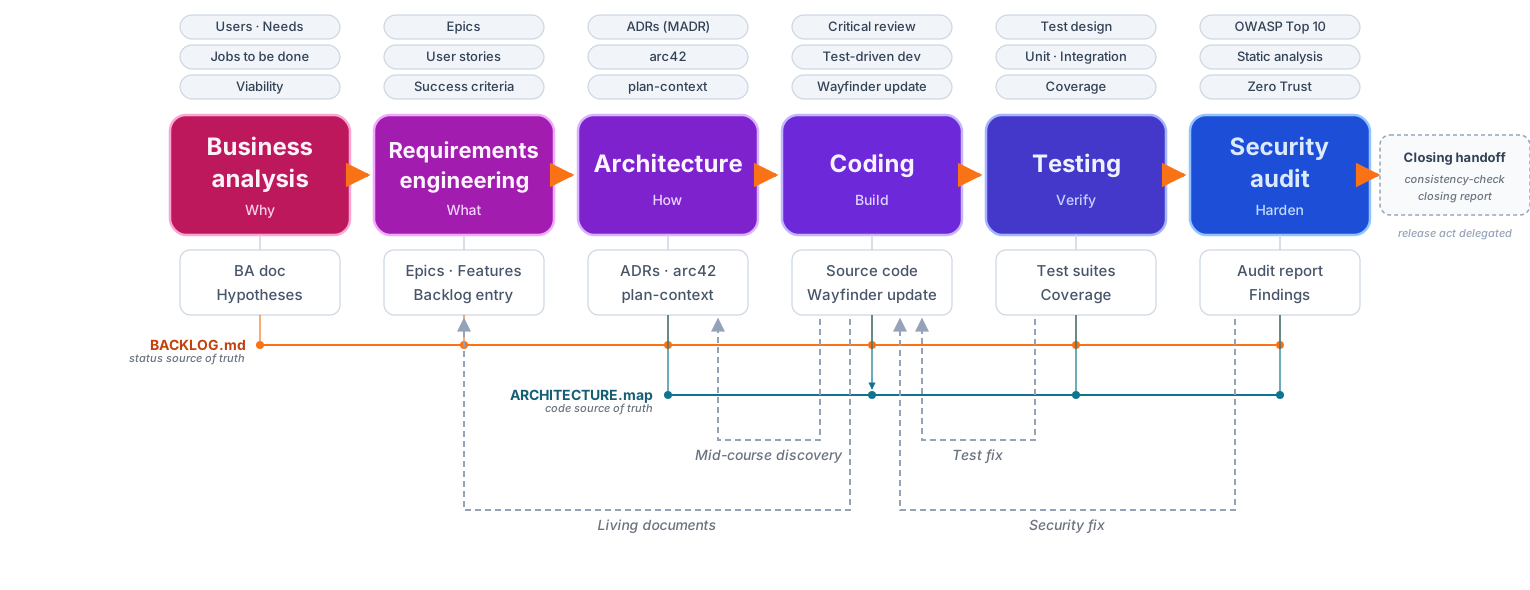
The project ships thirteen skills that run inside your AI coding
assistant. Six are V-Model phase skills (business analysis,
requirements engineering, architecture, coding, testing, security
audit). Two are entry-point skills for non-greenfield projects
(reverse engineering, dia-migration). One is the on-demand workflow
guide (/dia-guide). Four are foundation skills (project conventions,
consistency check, humanizer, dia-bootstrap). Every
phase skill owns one part of the V-Model, has its own quality gates,
and hands off a structured artifact to the next phase. The guide is
called separately whenever the user wants an orientation read.
Every decision stays traceable from a real user problem through
requirements, architecture, code, tests, and a security audit.
Three entry points cover greenfield, brownfield, and migration projects:
- Greenfield:
/business-analysisstarts with structured discovery (users, needs, insights, critical hypotheses) and walks forward through the V-Model. - Brownfield:
/reverse-engineeringwalks the V backwards over an existing codebase and produces plan-context, ADRs, an arc42 snapshot, a FEATURE inventory, a backlog seed, and an evidence-based BA draft. Every claim is sourced to a file path or doc section. Nothing invented. - Migration:
/dia-migrationbrings an older DIA project (v1) or a pre-existing V-Model variant up to current conventions: cleans status drift, normalises ID schemas, flattens analysis/, regenerates the backlog as single source of truth.
The BA and RE agents ship a catalog of 32 innovation methods (qualitative interviews, extreme users, fly on the wall, cultural probes, persona synthesis, stakeholder maps, jobs to be done, brainwriting, TRIZ, wizard of oz, pre-mortem, value proposition quantification, and more) organised as method cards in the docs.
During a BA or RE session, when your answers go thin, the agent stops the interview and proposes the matching field method with a one-page card: what it produces, when to reach for it, how to run it, team and time, things that go wrong, and what to bring back to the session. The actual research work stays human-to-human: interviews with real users, observations in the real context, prototypes on real hands. The agent's job is to spot the gap and pick the right method, not to replace the work.
Pick your platform. Each installer drops the same thirteen skills with the same templates and quality gates into your tool of choice.
/plugin lives in the Claude Code CLI, not in the VS Code or
JetBrains extensions. If claude --version returns
command not found, install the CLI first:
curl -fsSL https://claude.ai/install.sh | bash    # official installer
# or: brew install --cask claude-code              # macOS Homebrew
# or: npm install -g @anthropic-ai/claude-code     # any OS with Node
Reopen your shell (source ~/.zshrc or ~/.bashrc), then install the
plugin:
claude/plugin marketplace add https://github.com/pssah4/digital-innovation-agents.git
/plugin install digital-innovation-agents@pssah4-skills
Type / in any new session to see the skills in autocomplete. The
dia-bootstrap skill loads automatically at session
start as a brief orientation.
VS Code, JetBrains, and Cursor extensions cannot install plugins.
Running /plugin marketplace add ... inside the VS Code Claude Code
extension returns /plugin isn't available in this environment.
Install once through the CLI as above. The skills land under
~/.claude/skills/ and the IDE extension picks them up from the same
global directory on the next session start. On Windows without WSL,
the CLI is experimental; install through WSL or copy the manually:
The manual install copies the complete plugin bundle (skills,
tools, hooks, scripts) under a stable path and symlinks the skills
into ~/.claude/skills/. Skills invoke tooling at
${DIA_PLUGIN_ROOT}/tools/..., so DIA_PLUGIN_ROOT is exported
from the install location. Re-run the block to update; it pulls
the latest commit and rewrites the bundle in place. Skills
renamed or removed in newer DIA versions (for example
dia-orchestrator from v2) are deleted explicitly so no stale
skill folders survive the upgrade.
# Stable plugin location. Override with DIA_PLUGIN_ROOT env if needed.
DIA_PLUGIN_ROOT="${DIA_PLUGIN_ROOT:-$HOME/.local/share/dia-plugin}"

# Clone or update the plugin bundle
if [ -d "$DIA_PLUGIN_ROOT/.git" ]; then
  git -C "$DIA_PLUGIN_ROOT" fetch --tags --prune
  git -C "$DIA_PLUGIN_ROOT" reset --hard origin/main
else
  mkdir -p "$(dirname "$DIA_PLUGIN_ROOT")"
  rm -rf "$DIA_PLUGIN_ROOT"
  git clone https://github.com/pssah4/digital-innovation-agents.git "$DIA_PLUGIN_ROOT"
fi

mkdir -p ~/.claude/skills

# Remove legacy DIA skills that were renamed or dropped
for legacy in dia-orchestrator; do
  rm -rf "$HOME/.claude/skills/$legacy"
done

# Symlink the current DIA skill set (covers future renames automatically)
for skill in project-conventions reverse-engineering business-analysis \
             requirements-engineering architecture coding testing \
             security-audit consistency-check humanizer dia-guide \
             dia-migration dia-setup dia-bootstrap; do
  rm -rf "$HOME/.claude/skills/$skill"
  ln -sfn "$DIA_PLUGIN_ROOT/skills/$skill" "$HOME/.claude/skills/$skill"
done

# Persist DIA_PLUGIN_ROOT so skills can resolve tools/ at runtime
shell_rc="$HOME/.zshrc"
[ -f "$HOME/.bashrc" ] && shell_rc="$HOME/.bashrc"
if ! grep -q "DIA_PLUGIN_ROOT=" "$shell_rc" 2>/dev/null; then
  echo "export DIA_PLUGIN_ROOT=\"$DIA_PLUGIN_ROOT\"" >> "$shell_rc"
fi
export DIA_PLUGIN_ROOT
After the first install, open a new shell so DIA_PLUGIN_ROOT is
set, then start claude. Skills resolve their helper scripts at
$DIA_PLUGIN_ROOT/tools/... regardless of the user-project cwd.
/add-plugin digital-innovation-agents
Or search for "digital-innovation-agents" in the Cursor plugin marketplace.
GitHub Copilot has no marketplace command. Install by copying the
.github/ directory plus the helper tools into your project. The
agents call flow.py, anchor.py, the migration scripts, and the
consistency check, so tools/ and scripts/ must be available
locally.
Re-run the block to update; the source checkout is pulled to the latest commit and each target subfolder is wiped before copy, so no stale Copilot agents, chat modes, or helper scripts survive an upgrade.
# Clone or update the source checkout
if [ -d /tmp/dia/.git ]; then
  git -C /tmp/dia fetch --tags --prune
  git -C /tmp/dia reset --hard origin/main
else
  rm -rf /tmp/dia
  git clone https://github.com/pssah4/digital-innovation-agents.git /tmp/dia
fi

mkdir -p .github

# Wipe old DIA copies before installing the current set
for sub in agents chatmodes instructions templates; do
  rm -rf ".github/$sub"
  cp -r "/tmp/dia/.github/$sub" ".github/$sub"
done
cp /tmp/dia/.github/copilot-instructions.md .github/copilot-instructions.md

# Install the helper tools (flow.py, anchor.py, migration, hooks)
# at the project root so the agents can invoke them
for sub in tools scripts hooks; do
  rm -rf "$sub"
  cp -r "/tmp/dia/$sub" "$sub"
done

# Skills resolve tools/ relative to the project root in this layout,
# so DIA_PLUGIN_ROOT points at the project itself
echo 'export DIA_PLUGIN_ROOT="$(pwd)"' >> .envrc 2>/dev/null || true
The Copilot install brings the helper tools into the project rather than to a global location because Copilot agents run with the project as their working directory and have no plugin-bundle path to fall back on.
Copilot Chat picks the agents up automatically on the next session. In Copilot Chat:
@business-analyst I want to build a tool that helps teams run better retrospectives
@requirements-engineer Here is my BA document, create epics and features
@architect Design the architecture based on the requirements handoff
@developer Implement the first feature
@debugger Tests are failing, analyze the error log
The Copilot agents run the same Exploration / Ideation / Validation cycle, the same templates, and the same quality gates as the Claude Code skills.
Tell Codex:
Fetch and follow instructions from https://raw.githubusercontent.com/pssah4/digital-innovation-agents/main/.codex/INSTALL.md
Detailed docs: .codex/INSTALL.md
Tell OpenCode:
Fetch and follow instructions from https://raw.githubusercontent.com/pssah4/digital-innovation-agents/main/.opencode/INSTALL.md
Detailed docs: .opencode/INSTALL.md
gemini extensions install https://github.com/pssah4/digital-innovation-agentsTo update:
gemini extensions update digital-innovation-agentsStart a session in your chosen platform and try one of these:
/dia-setup                 Activate the workflow in this project
/dia-guide                 Full guided cycle from idea to security audit
/business-analysis         Start a structured business analysis
/reverse-engineering       Brownfield entry for an existing codebase
/dia-setup is the first call in any new project. It asks for the
mode (off, git-only, or github-sync), writes
.dia/config.toml, and adds a managed anchor block to your
existing CLAUDE.md, AGENTS.md, GEMINI.md, .cursorrules, or
similar agent files. Re-run any time to change the mode or remove
the anchor.
Or ask a natural-language question like "help me analyse this business problem". The agent should invoke the matching skill.
Troubleshooting:
- Claude Code or Cursor: restart the session, the SessionStart hook loads the skill overview automatically.
- Codex: verify the symlink with
ls -la ~/.agents/skills/digital-innovation-agents. - OpenCode: check logs with
opencode run --print-logs "hello" 2>&1 | grep -i digital-innovation. - Gemini CLI: run
gemini extensions list.
The thirteen skills split into three groups: V-Model phase skills (the
ten that own a phase or move you between phases), foundation skills
(rules and consistency), and the orientation skill (using-digital- innovation-agents loads on session start to introduce the workflow).
| Phase | What it does | Claude Code | Copilot |
|---|---|---|---|
| Reverse Engineering | Brownfield entry. Walks the V backwards over an existing codebase and produces plan-context, ADRs, arc42, FEATURE inventory, backlog seed, and an evidence-based BA draft with every claim sourced. | /reverse-engineering |
@reverse-engineer |
| DIA Migration | Migrates a v1 project, an older V-Model variant, or a brownfield repo to current DIA conventions. Idempotent, branch-safe, no source-code edits. | /dia-migration |
built-in |
| Business Analysis | Exploration, Ideation, and Validation cycle with structured interviews, probing techniques, and the 32-method discovery catalog. | /business-analysis |
@business-analyst |
| Requirements Engineering | Epics, FEAT-EE-FF features, tech-agnostic success criteria, user stories across functional / emotional / social levels, critical hypotheses. | /requirements-engineering |
@requirements-engineer |
| Architecture | ADRs in MADR format with the abstraction rule (no code paths in core sections), arc42 snapshot, wayfinder maintenance, plan-context bridge to implementation. | /architecture |
@architect |
| Coding | Context handoff, critical review against the real codebase, PLAN-NN persistence with coverage gate, bug-capture entry, artifact writeback during implementation. | /coding |
@developer |
| Testing | Unit and integration tests with the AAA pattern, FIRST principles, coverage targets, and a fix-loop until green. | /testing |
built-in |
| Security Audit | OWASP Top 10, LLM Top 10, SAST, SCA, Zero Trust review with a fix-loop. Two modes: per-item audit and periodic full-codebase audit. | /security-audit |
@security-auditor |
| V-Model Workflow Guide | On-demand orientation: reads project state, audits the latest handoff entry, recommends the next phase skill, and emits the Closing Handoff after a green security audit. The guide does not perform CRUD or drive transitions; phase skills are autonomous. | /dia-guide |
built-in |
| Debugging | Root-cause analysis, systematic error resolution, causal chain documentation. Bugs land as FIX-EE-FF-NN rows in the backlog plus detail files in _devprocess/requirements/fixes/. |
default agent | @debugger |
| Skill | What it does | Claude Code |
|---|---|---|
| Project Conventions | Three-layer documentation model (Wayfinder, Rule sets, Backlog, Detail artifacts), directory structure, naming standards, writing-style rules. | /project-conventions |
| Consistency Check | Verifies the V-Model artifact graph: dead links, orphan features, status drift, missing references. Modes A (syntactic), B (semantic), C (full). Mandatory at every phase boundary. | /consistency-check |
| Humanizer | Strips AI vocabulary, em dashes, negative parallelisms, and filler from every artifact. Enforces sentence case and active voice. | /humanizer |
| DIA Bootstrap | Loads automatically on session start. Carries the entry-point catalog, helper-script path resolution rule, activation contract, opt-out behaviour. Not invoked manually. | dia-bootstrap |
The skills adapt their depth to your project scope. Match the tier to the size of the question.
| Scope | Exploration | Ideation | Validation | Typical duration |
|---|---|---|---|---|
| Simple Test | Minimal (user and problem) | Describe the solution | Skip | Hours to 1-2 days |
| Proof of Concept | Shortened (user, needs, HMW) | Full | Hypotheses and feasibility | 1-4 weeks |
| MVP | Full 10-section Exploration board | Full | Full market assessment | 2-6 months |
A Simple Test does not need a stakeholder map. An MVP does not get away without one.
Success Criteria stay free of technology vocabulary. No OAuth, REST,
PostgreSQL, or React in the contract between the user and the team.
Technical details live in a separate Technical NFRs section and in the
ADRs that follow in /architecture. See the
Tech-agnostic Requirements
page in the docs for the full ruleset.
ADRs, features, architecture docs, and the backlog update continuously
during implementation. At release time, documentation reflects what was
actually built, not what was originally planned. The
_devprocess/context/BACKLOG.md file is the single source of truth
for project state, and every phase skill touches it in the same edit
pass as the code it affects.
- Understand the problem before designing the solution.
- Separate what the system does (user-observable, tech-free) from how it does it (ADRs, NFRs).
- Propose the right research method instead of grinding through a question list when your answers go thin.
- No phase proceeds until its quality gate is met.
- Every agent reads the real codebase before producing output. The
project's
CLAUDE.mdalways takes precedence over generic skill instructions.
Every guide, tutorial, concept page, and method card lives at pssah4.github.io/digital-innovation-agents.
Start here:
- Your first Business Analysis tutorial
- A full V-Model run
- Discovery methods, Ideation methods, Validation methods
- Reverse Engineering guide
| Version | Status | Install |
|---|---|---|
| v3 (main) | Active, recommended. Three-layer documentation model, FEAT-EE-FF IDs, FIX/IMP detail files, PLAN-NN persistence, GitHub flow.py integration, subtype-aware Done-definition. | See Quick start above |
| v2.x | Frozen snapshot, no longer maintained | git clone --branch v2.4.0 https://github.com/pssah4/digital-innovation-agents.git |
| v1.0.0 | Frozen snapshot, no longer maintained | git clone --branch v1.0.0 https://github.com/pssah4/digital-innovation-agents.git |
See CHANGELOG.md for details. Existing v1 or v2 projects
upgrade through /dia-migration. v1 and v2 are historical snapshots
and not actively maintained; for current behaviour use the marketplace
or platform-specific install on v3.
MIT License. Copyright (c) 2025 Sebastian Hanke. See LICENSE.
Built with:
- Claude Code Skills, Claude Agent SDK, and GitHub Copilot Agents
- Innovation methodology from design thinking and lean startup practice
- Jobs-to-be-Done framework
- arc42 architecture documentation template
- MADR (Markdown Architectural Decision Records)
- OWASP Top 10 and LLM Top 10
- AAA pattern and FIRST principles for testing