English · Français
Accessibility scanning for Angular projects that reports the line of code, not a CSS selector.
npm install -D @rgaa-source/cli
npx rgaa-source check --project .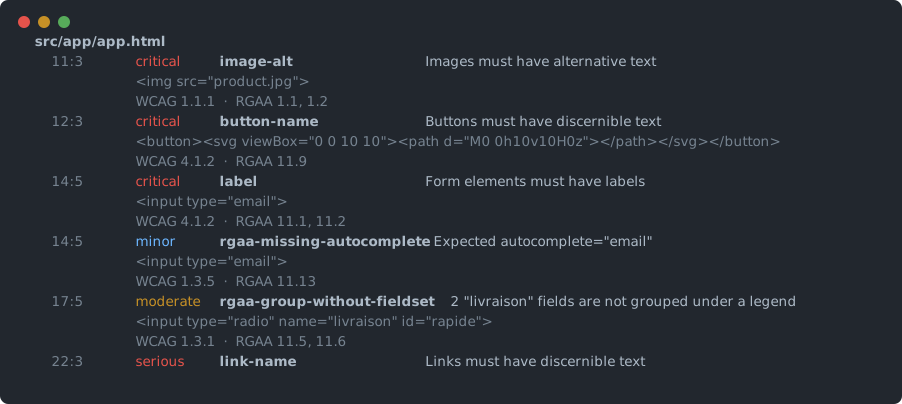
One prerequisite: your project must build. The tool instruments your
templates and then runs ng build, so if npx ng build already fails, start
there. Playwright also needs a browser — on Windows it drives the Edge you
already have; elsewhere, npx playwright install chromium then
--browser chromium.
Expect twenty seconds to a few minutes: your own build dominates the runtime, and progress is shown while it works.
To stop repeating the same options, put an rgaa.config.json next to your
package.json:
{ "project": ".", "routes": ["/", "/contact"], "minScore": 80 }A flag always beats the file. --no-config ignores it entirely.
RGAA 4.1.2 is the French accessibility reference frame — the national implementation of WCAG 2.1 AA, expressed as 106 auditable criteria across 13 topics, with an official audit grid and a published methodology.
It matters beyond France. The European Accessibility Act has applied since 28 June 2025 across the Union, conformity is demonstrated through EN 301 549, and RGAA is how France instantiates it. Penalties in France reach €50,000 per service, and the first inspections began in January 2026.
If you have no RGAA obligation, the tool is still useful: it runs axe-core, so everything it finds is a WCAG problem first. The RGAA mapping and the audit grid are simply extra output you can ignore.
Existing tools — axe DevTools, Lighthouse, WAVE, and on the French side RGAA Lab,
Assistant RGAA, Tanaguru — stop at a CSS selector like
body > main > form > input.email. That selector matches no file you can open,
and finding the template that produced it is the slow, manual, untooled part of
the job.
Here, a violation found in the rendered page carries its own source address:
image without a text alternative   src/app/checkout/checkout.component.html:42:8
button without an accessible name  src/app/shared/icon-button.component.html:7:3
@rgaa-source/angular rewrites your templates before the build, putting a
data-a11y-src="file:line:column" attribute on every rendered element, at the
offsets Angular's own compiler reported (parseTemplate → sourceSpan).
The rewrite is pure text insertion: the AST is never re-serialised, so your formatting, bindings and control-flow syntax survive untouched.
At runtime, a violation reads its location off the offending node. The result is exact or absent, never guessed — a developer sent to the wrong line loses more time than a developer sent nowhere at all.
This is the Angular equivalent of what
babel-plugin-transform-react-jsx-source (_debugSource) gives React, which
did not exist here until now.
| Package | Role |
|---|---|
@rgaa-source/core |
Types, rule interface, axe-core engine, WCAG ↔ RGAA mapping, scoring. Pure TypeScript with no framework dependency: the same engine runs in the CLI, under Playwright, or in an extension. |
@rgaa-source/angular |
The bridge. Angular template parsing and rewriting, and the instrumentation lifecycle. |
@rgaa-source/report |
Self-contained HTML report, RGAA audit grid, baseline comparison. |
@rgaa-source/fix |
Fixes applied at source positions, graded by the judgement they demand. |
@rgaa-source/cli |
The rgaa-source check and rgaa-source criteria commands: Playwright, build orchestration, reporting. |
rgaa-source check --project ./my-app          # instrument, build, serve and scan
rgaa-source check https://example.com         # scan an already-served page
rgaa-source criteria                          # what the engine can reach of RGAA
On a project, every violation comes out with its file, its line and the RGAA criteria it bears on:
Main options: --route (repeatable), --min-score, --json, --html,
--grid, --baseline, --browser, --reuse-build, --force, --verbose,
--violations-only (faster, but disables scoring), --config, --no-config.
rgaa-source --help lists them all.
rgaa.config.json, next to your package.json:
{
  "project": ".",
  "routes": ["/", "/contact"],
  "minScore": 80,
  "html": "report.html",
  "grid": "grid.csv",
  "lang": "en"
}
JSON and not JavaScript: a configuration file that executes code is a file your CI executes, and nothing here needs that power.
What goes where. The file carries what belongs to the project — routes,
threshold, language, deliverables: these are properties of the application, true
everywhere. Flags carry what belongs to the run — --browser chromium because
the runner has no Edge, --dry-run because you are exploring.
That split is what keeps a local run and CI identical. Settings that live only in a workflow file drift silently from what developers run, and the gate becomes the "it passed on my machine" nobody can settle. Committed, the file makes a threshold change visible in code review.
A flag always beats the file, and --no-config ignores it entirely. An unknown
key or a value of the wrong shape is reported and then ignored — a
misspelled key swallowed in silence is how someone loses an afternoon. An
unreadable file, by contrast, stops the run: that is a mistake its author wants
to hear about.
Output defaults to French, including axe-core's messages, taken from its
official translation. Use --lang en for English. Everything is translated in
the page before results are produced, so the console, the HTML report, the grid
and the JSON all speak one language with no double translation.
The exit code depends on context. In a terminal, the scan reports and exits
0: a human exploring an existing codebase reads exit 1 as a crash. Outside a
terminal — in CI — it blocks on what it finds. --fail and --no-fail force
either behaviour, and the report says when a run would have failed in CI.
rgaa-source check --project ./my-app --fix              # writes what needs no judgement
rgaa-source check --project ./my-app --fix-suggested    # also drafts what you must word yourself
rgaa-source check --project ./my-app --fix --dry-run    # shows the diff, writes nothing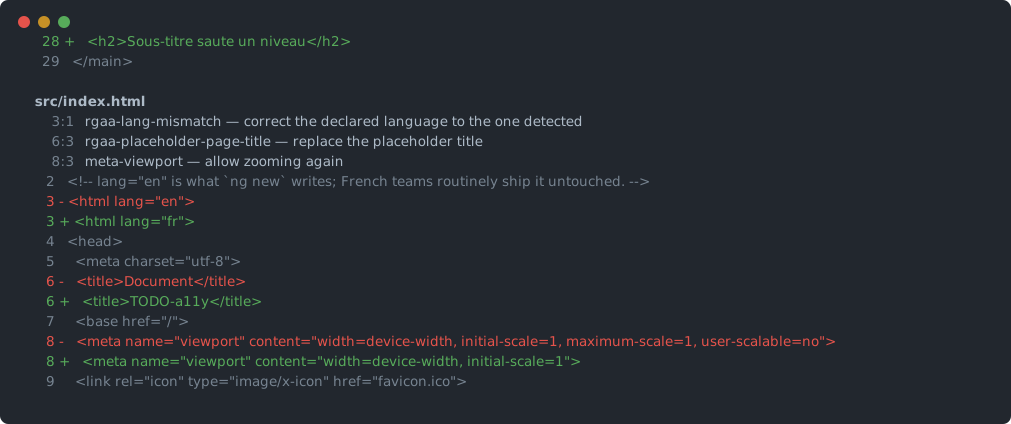
The full plan is always shown as a diff before anything is written. Editing someone's code automatically is only acceptable if they can read all of it first; a "12 fixes applied" counter is not readable.
Fixes are graded by the judgement they demand:
| Level | Meaning | Applied |
|---|---|---|
| Safe | Mechanically certain without knowing anything about the page's meaning: removing a positive tabindex, re-enabling zoom. |
by --fix |
| Suggested | The shape is known, the words are not: alt, aria-label, page title, heading level. Writes a TODO-a11y marker. |
by --fix-suggested |
| Manual | Contrast, focus order, semantic relevance. Reported, never written. | never |
The list of safe fixes is short, and that is deliberate. Most accessibility fixes consist of writing text that describes something, and no tool knows what an image shows or what a button does. A wrong alternative is worse than a missing one: a screen reader believes it, whereas an absent alternative stays detectable.
Writing to sources is final, so the command refuses to touch a file whose working copy differs from the index, where git could give nothing back. An already-staged change does not block — its content is recoverable.
rgaa-source check --project ./my-app --html report.html --grid grid.csvThe HTML report is self-contained: no external stylesheet, no script, no network call. It must still open correctly from an email attachment in two years.
The grid uses the exact columns of the official evaluation template — Topic, Criterion, Recommendation, Status, Derogation, Changes required, Comments — for all 106 criteria, as semicolon-separated CSV with a BOM, without which Excel in a French locale renders accented headings as mojibake.
No row is ever marked C (conformant). Under the RGAA method a criterion is
conformant only if all of its tests pass, and an automated check covers a
fraction of them: criterion 1.1 alone has eight. Declaring a criterion conformant
because the single verifiable aspect came out clean would assert what was never
established, in the very document whose job is to record it. What has not been
disproved stays NT, not tested — where the official template puts it itself. On
the test application: 15 NC, 91 NT, zero C.
What saves an auditor time is the NC rows, already filled in with exact source locations.
rgaa-source check --project . --baseline .rgaa-baseline.jsonThe first run records the baseline and passes; later runs compare, and fail only on new findings of critical or serious severity.
This is what makes the tool adoptable on an existing codebase. Nobody will fix hundreds of findings before the next release, but everyone can agree not to add more — and a gate a team can hold is a gate they leave switched on. The baseline file is committed with the code, so remaining debt becomes visible in review instead of disappearing.
A finding's identity rests on the rule, the file and the markup, never on the line number: that moves the moment an import is added above, and a CI that cries wolf gets deleted.
examples/github-workflow.yml is the workflow to
copy.
Exit codes: 0 within threshold, 1 violations, insufficient score or a
regression, 2 the scan itself failed.
Templates are rewritten in place. Before each rewrite the original is parked
in node_modules/.cache/rgaa-restore/ — already git-ignored — and not merely
held in memory. A process killed between the write and the restore is therefore
recovered automatically on the next run.
That is what lets the scan depend on no git guard at all. The variant that refused to run on an uncommitted file blocked the most natural gesture — fix, then re-scan — and a guard that trips constantly ends up disabled, protecting nobody. Only writing fixes, which is final, still requires that git be able to give the original back.
The table of 106 criteria is generated from the official DINUM source
(DISIC/RGAA), never typed by hand. The
generated file carries the source URL and the SHA-256 digest of what produced it,
and the generator fails unless it finds exactly 106 criteria across 13 topics.
Going through WCAG alone would be unusable: success criterion 1.1.1 underpins
nineteen RGAA criteria across seven topics on its own, so a missing alt would
cite captions, CAPTCHAs and video transcripts. The mapping is therefore
established per rule, each entry justified against the criterion's official
wording. A test verifies that no rule cites a criterion absent from the
reference data.
Seven rules run alongside axe, each answering an RGAA criterion axe does not test — either because it has no equivalent rule, or because its own stops short of what the French reference frame asks.
| Rule | Criterion | What it finds |
|---|---|---|
rgaa-lang-mismatch |
8.4 | The declared language does not match the content |
rgaa-placeholder-page-title |
8.6 | A page title nobody ever wrote |
rgaa-skip-link-missing |
12.7 | No skip link to the main content |
rgaa-group-without-fieldset |
11.5, 11.6 | Fields of the same nature with no grouping or legend |
rgaa-missing-autocomplete |
11.13 | Identity field without an autocomplete token |
rgaa-link-not-explicit |
6.1 | Link text that says nothing out of context |
rgaa-duplicate-link-text |
6.1 | The same link text for different destinations |
The first is the most useful. ng new writes lang="en" into the shell, French
teams ship it untouched, and axe only checks that the code is syntactically
valid. A screen reader then pronounces French with English phonetics, which makes
it unintelligible. The detection is deliberately cautious: below forty words it
stays quiet, and the detected language must lead the declared one clearly before
it speaks.
The last two are review rules: RGAA 6.1 accepts an implicit link when its context makes it explicit, which no automated check can settle. They produce points to verify, not failures, and do not enter the score — counting them as passes would inflate it by padding the denominator with checks that can never fail.
Rules are bundled and injected into the page like axe itself. Adding a rule means adding a file and a line in the registry: the scanner is never touched. A rule that throws costs its own finding, never the whole scan.
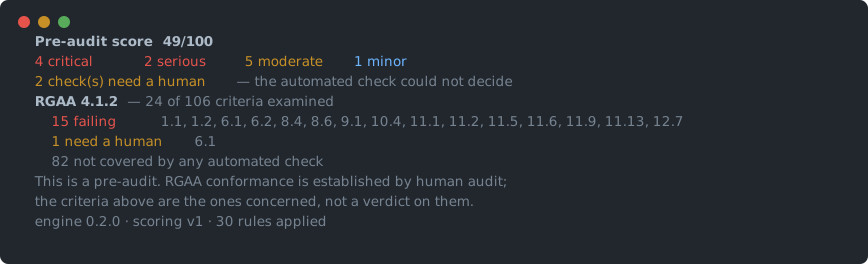
The score it produces is an automated pre-audit score. It is not an "RGAA conformance rate", which is a regulatory notion established by human audit.
rgaa-source criteria publishes the engine's real reach: 35 of the 106
criteria are addressable by an automated check, or 33%. The other 71 require a
human, and every report says so. The criteria cited are the ones a violation
bears on, not a verdict rendered on them.
This tool stops where human judgement begins: perceived contrast, whether a text alternative is apt, tab order, the coherence of a journey. That is the majority of RGAA, and no automated check will ever cover it.
That work is offered as a service — full RGAA 4.1.2 audits, Angular remediation, European Accessibility Act conformance, and team training. It is delivered in French, for the French and European market; see the French README for details, or reach out through my GitHub profile.
Development commands, how to add a rule or a fixer, and the principles to follow are in CONTRIBUTING.md.
Version 0.1.1, first release. The bridge — locating a violation down to its line of code — is verified on every CI run against a real Angular build, and validated on two open source projects.
Tested on Angular 15, 16, 17, 19, 21 and 22 — same lines, same columns, same score on all six. Template parsing uses Angular 22's compiler, installed alongside yours without interfering with it: template syntax newer than v22 would require an update to this package.
The historic *ngIf / *ngFor syntax is covered as well as the @if / @for
blocks: the bridge works on positions in the file, not on control-flow syntax.
Angular 15 is the verified floor. Angular 14 could not be tested: it no
longer builds under a current Node, its types tripping over Disposable which
its TypeScript 4.7 does not know. That is a limit of Angular 14, not of this
tool.
- Angular only for now. The core, the fixes and the reports depend on no framework: adding React or Vue takes an adapter, not a rewrite.
- Your project must build. The tool instruments and then runs
ng build. - Locations exist only on an instrumented build. Scanning an arbitrary URL reports violations but cannot attach them to any file, and the report says so.
- What is produced at runtime cannot be located — an avatar coming from an API, the contents of a third-party component. Those are listed separately rather than pinned to an approximate line.
- About a third of the 106 RGAA criteria is reachable automatically.
rgaa-source criteriapublishes exactly which. - Cross-origin iframes are out of the scan's reach.
More rules and more fixes, an adapter for a second framework, and a browser extension inheriting the same bridge — it would show the file and the line where existing extensions show a CSS selector.
Feedback from real projects is what is missing most: open an issue, especially if a location comes out wrong.