Windows-native, local-first contextual lookup: select a word anywhere in Windows, trigger a hotkey, and get a compact dictionary card explaining the word as used in that context — answered by a local model via LM Studio. Smart Paste is a preview-first clipboard transformer for paragraph-level rewriting and transformation.
Contextual Intelligence is for Windows users who want local-first text assistance without sending selected text or clipboard content to a hosted cloud assistant. It is aimed at people who already use, or are willing to run, LM Studio locally: writers, developers, researchers, and operators who often need quick contextual explanations or text transformations from the app they are already working in.
This is not a polished packaged consumer app yet, not a hosted service, and not a tool for extracting secrets or password fields. Secure or unsupported fields should fail safely instead of being forced through capture.
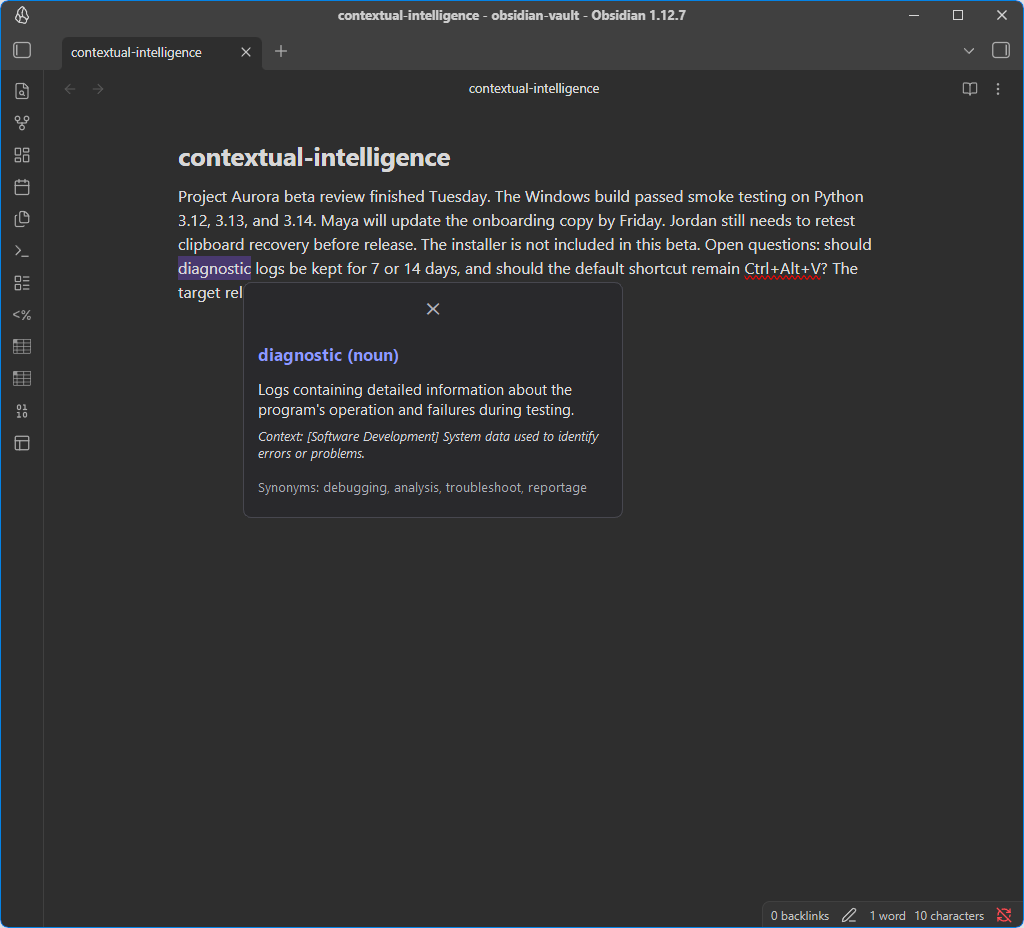
Contextual Lookup: select text → Ctrl+Alt+D → explanation
Smart Paste: copy text → Ctrl+Alt+V → transform → preview → Copy
- Contextual Lookup: selected text and surrounding context become a compact explanation popup.
- Smart Paste: clipboard text plus a selected format and optional instruction becomes a preview-first transformed result before copy/paste.
Smart Paste transforms the current clipboard contents, not the current
selection. Selecting different text without copying it leaves the previous
clipboard text as Smart Paste's input; copy the text you want to transform
before pressing Ctrl+Alt+V.
- Explains selected words or short phrases in the context where they appear.
- Transforms copied text through a preview-first Smart Paste palette with built-in Plain, Markdown, Markdown table, JSON, and Action items formats.
- Keeps clipboard mutation explicit: transformed text is copied only when the user clicks Copy.
- Uses local model serving by default through LM Studio's OpenAI-compatible API.
- Treats unsupported or failed paths as product states that need clear user guidance, not raw internal errors.
- It does not run under WSL; the app depends on Windows hotkeys, clipboard, UI Automation, and Qt UI behavior.
- It does not automatically paste transformed text back into the source application.
- It does not include a cloud fallback by default.
- It is not a general screen reader or OCR tool.
This is a Windows-only, run-from-source developer preview. Contextual Lookup and Smart Paste are implemented and covered by automated/manual regression tests. Python wheel/sdist packaging and clean-install checks are implemented; installer/binary bundling, signing, speech input, and broader app-compatibility polish are still planned.
- Project knowledge: longer design notes are maintained in a local LLM Wiki / knowledge base; this repository keeps the public-facing implementation docs.
- Project rules:
PROJECT_RULES.md— canonical project-specific agent, QA, and graceful degradation rules. Tool-specific files such asGEMINI.md,AGENTS.md, orCLAUDE.md, if added, should point back there. - Manual QA:
docs/qa/manual-regression.md— repeatable smoke, coexistence, clipboard, placement, failure-state, and graceful degradation checks. - Task tracking: work is managed in an issue tracker with acceptance criteria and QA evidence.
- Status: Phase 2 (Smart Paste MVP), Phase 3 core robustness, and startup/Python-packaging hardening are complete;
v0.1.0-dev.1release validation is complete; Phase 4 (Speech Input / Voice-to-Transform) is planned.
smart-paste-demo-final.mp4 |
|
|
Smart Paste transforms copied text through a preview-first palette. |
Contextual Lookup explains a selected term in place. |
GitHub's rendering of repository-local videos can vary. If the video does not render in the README, open
docs/assets/smart-paste-demo.mp4directly.
Contextual Intelligence is local-first by default.
- Selected text and clipboard text are processed locally by the app.
- Text is sent only to the configured OpenAI-compatible endpoint, typically LM Studio running on the same machine.
- No cloud fallback is enabled by default.
- Smart Paste reads clipboard text only when opened/triggered and does not mutate the clipboard until the user clicks Copy.
- Clipboard history is in-memory only and is not persisted to disk by this app.
- High-value non-text clipboard formats such as images, files, and audio are protected from destructive fallback handling.
- Logs are intended for capture tier, timing, and failure diagnostics, not content storage.
If you configure LM Studio or another OpenAI-compatible endpoint on another machine, selected or copied text will be sent to that endpoint. Plain HTTP is accepted only for loopback addresses and literal private/link-local IP addresses; public IPs and hostname-based non-local endpoints require HTTPS. Traffic to a private-LAN HTTP endpoint is not encrypted, so use only infrastructure and networks you trust.
Contextual Lookup is UIA-first. When an app does not expose selected text
through Windows accessibility, a clipboard-based capture fallback exists — but
it is disabled by default and must be explicitly enabled in
%APPDATA%\contextual-intelligence\config.toml:
enable_clipboard_fallback = trueWhen enabled, invoking Lookup authorizes a temporary synthetic copy
(Ctrl+C sent to the focused app) only after UIA capture fails, and the
popup visibly identifies results captured this way. Before enabling it,
understand exactly what it does:
- Your clipboard text is temporarily replaced during the capture and then restored.
- Rich clipboard formats (HTML/RTF metadata alongside text) are not preserved — only the text is restored. Captures are refused outright when the clipboard holds images, files, audio, or other content that could not be restored.
- Windows Clipboard History (Win+V), cloud clipboard sync, and third-party clipboard managers may observe the temporary selection — successful restoration does not remove it from those histories.
- Restoration is conditional and avoids observed changes: it runs only when the detected clipboard change is attributed to the target app's process family (by executable name) and the clipboard still holds exactly the state that attributed copy produced, verified while the clipboard is held open. A change observed from an application with a different executable name is never overwritten. One honest limit: attribution is by process family, not exact process identity (deliberately, so multi-process apps like browsers and Electron keep working) — a clipboard write from another process with the same executable name cannot always be distinguished from the synthetic copy.
- If restoration fails, the app tells you immediately with actionable guidance instead of continuing silently.
Smart Paste's guarantee is separate and unchanged: it reads the clipboard when opened and does not mutate it until you explicitly click Copy.
- Windows 11 (Win32 + UI Automation; will not run under WSL)
- uv (Python 3.12 pinned via
.python-version; Python 3.12–3.14 are tested for this prerelease, while later Python versions may install but are not yet validated) - LM Studio serving an OpenAI-compatible API on
localhost:1234by default, or on a trusted private-LAN IP configured throughLMSTUDIO_BASE_URL(default model:google/gemma-4-e4b)
Override the model, endpoint, token limits, or API key using the configuration file %APPDATA%\contextual-intelligence\config.toml or process environment variables (such as LMSTUDIO_BASE_URL, LMSTUDIO_API_KEY, and CI_MODEL).
For development and debugging, you can load settings from an explicit environment file by passing the --env-file PATH option to the command line at startup. Note that configuration files (including .env files) are never loaded implicitly from the current working directory.
-
Confirm you are on Windows 11. This app depends on Win32 hotkeys, clipboard behavior, foreground-window handling, Qt windows, and UI Automation.
-
Install LM Studio and start its local server.
-
Load a local instruct model in LM Studio before running the app.
-
Clone the repository and install dependencies:
git clone https://github.com/kaizen-commits/contextual-intelligence.git
cd contextual-intelligence
uv sync
-
Run the smoke test:
uv run ci-lookup smoke -
Try a non-GUI capture/lookup flow:
uv run ci-lookup capture --delay 3
uv run ci-lookup lookup --delay 3
-
Launch the tray app:
uv run ci-lookup tray -
Test against harmless sample text before using it in real work.
Model names and quantizations vary in LM Studio, so treat these as starting families rather than strict requirements.
| Model family | Expected rough behavior |
|---|---|
| Gemma 3/4-class 4B instruct model | Good first choice for short contextual definitions and simple paste transforms. Usually responsive once loaded; the first request may be slower while LM Studio warms the model. |
| Qwen 2.5/3-class 7B instruct model | Often stronger for instruction following and formatting transforms, with higher memory use and latency depending on hardware and quantization. |
If the smoke test fails, check that LM Studio is running, the model is loaded, and the endpoint is correct. HTTP endpoints must use loopback or a literal private/link-local IP address; public IPs and hostname-based non-local endpoints must use HTTPS.
git clone https://github.com/kaizen-commits/contextual-intelligence.git
cd contextual-intelligence
uv sync

uv run ci-lookup smoke
uv run ci-lookup capture --delay 3
uv run ci-lookup lookup --delay 3
uv run ci-lookup trayuv run normally discovers a project from the current directory or one of its
parents. To launch the tray app from another directory, point uv at the cloned
repository explicitly:
$repo = "C:\path\to\contextual-intelligence"
Remove-Item Env:PYTHONPATH -ErrorAction SilentlyContinue
uv run --project $repo --no-sync ci-lookup tray
--no-sync uses the existing, already-synchronized project environment and
avoids trying to replace the launcher while the tray app is running. After
pulling dependency or lockfile changes, stop the app and synchronize explicitly:
$repo = "C:\path\to\contextual-intelligence"
uv sync --project $repo --locked
uv run ci-lookup tray starts the tray app with global hotkeys. Use
uv run ci-lookup listen for a simpler terminal-only hotkey loop where
Ctrl+Alt+D triggers Lookup until Ctrl+C exits.
--delay N waits N seconds so you can click into another app and select a
word — the capture/lookup loop is testable without hotkey plumbing.
uv run ci-lookup smoke              # LM Studio round trip + loaded model list
uv run ci-lookup capture --delay 3  # select a word anywhere, see the captured payload
uv run ci-lookup lookup --delay 3   # full loop: capture -> validate -> streamed answer
uv run ci-lookup listen             # Ctrl+Alt+D triggers lookup until Ctrl+C
uv run ci-lookup tray               # tray app with Lookup and Smart Paste hotkeys
uv run pytest                       # automated regression suite
uv run ruff check . # lintContextual Intelligence shows local model output; it does not guarantee that the answer or transformation is correct. Treat Lookup answers as quick context, not authoritative references, and review Smart Paste results before copying them into another app.
Local models may produce inaccurate, biased, incomplete, or unexpected text. Do not use model output as medical, legal, financial, safety-critical, or other professional advice without independent verification.
- Windows only; WSL is not supported.
- UI Automation coverage varies by application.
- Protected/password fields are intentionally not captured.
- Some Electron, terminal, game-overlay, or heavily customized apps may expose limited text context.
- Smart Paste currently copies transformed text explicitly; it does not automatically paste back into the source app.
- Speech input, installer packaging, and OCR/image clipboard support are planned, not complete.
src/contextual_intelligence/
├── models.py                    ContextPayload, PastePayload, PasteResult — strict validation
├── paste_presets.py             Built-in Smart Paste formats and output contracts
├── clipboard.py                 Public text-only clipboard utility with retry backoff
├── capture/
│   ├── __init__.py              CaptureProvider protocol + tier orchestrator
│   ├── uia.py                   tier 1: UIA TextPattern (primary)
│   └── clipboard_fallback.py    tier 2: deterministic clipboard automation fallback
├── ui/
│   ├── tray.py                  QSystemTrayIcon + multi-hotkey background bridge
│   ├── popup.py                 Frameless near-cursor popup for Contextual Lookup
│   ├── palette.py               Frameless interactive palette for Smart Paste
│   ├── worker.py                LookupUIA capture & LLM streaming worker
│   ├── paste_worker.py          Smart Paste LLM streaming worker
│   └── positioning.py           Multi-monitor placement & DPI scaling fallback
├── llm.py                       LM Studio client + lookup/paste prompts & spelling inference
├── hotkey.py                    RegisterHotKey loop with multi-hotkey degradation
├── config.py                    settings + TOML override
├── log.py                       capture telemetry goes to stderr
└── cli.py                       smoke / capture / lookup / listen / tray
Design rules carried from the original app's failure: capture listeners have an explicit arm → capture → disarm lifecycle with tests proving nothing stays armed after a cycle; every capture is validated (empty/mojibake/oversized rejected) before it reaches the model; every attempt logs tier, duration, and failure reason so fallback work is driven by telemetry, not guesses.
See SECURITY.md for vulnerability reporting and endpoint trust notes.
The project currently runs from source. If installers or binary bundles are published later, include third-party license notices for runtime dependencies, especially PySide6 / Qt. PySide6 is available under LGPL/GPL terms; binary packaging must preserve the applicable Qt notices and dynamic-linking/compliance requirements.
Contextual Intelligence is designed and maintained by Kaizen, with assistance from AI coding and reasoning tools:
- Hermes / GPT-5.5 — project orchestration, architecture review, QA planning, documentation, and implementation support
- Claude Fable 5 — implementation and code review assistance
- ChatGPT — design exploration and product reasoning
- Gemini / Antigravity — implementation planning, review, and alternative design suggestions
Final product decisions, testing, integration, and release responsibility remain with the human maintainer.
MIT. See LICENSE.