Real-time usage tracking for Antigravity AI models






-
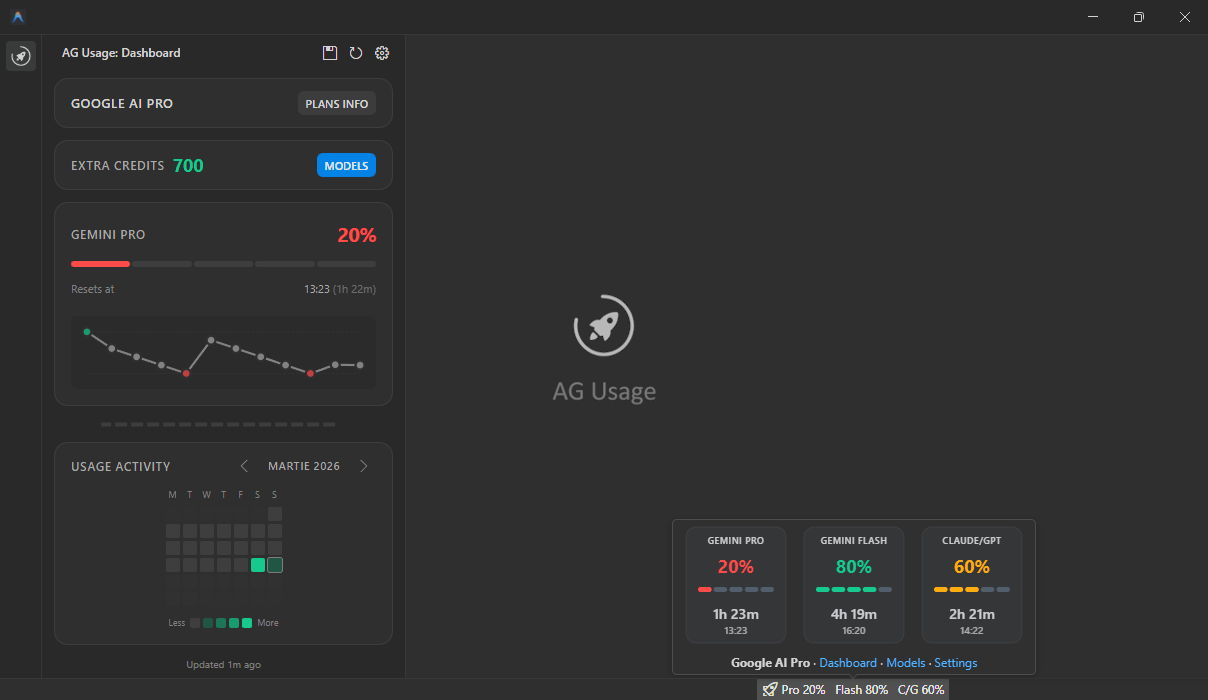
Webview panel: Includes a dashboard showing your current quotas, Extra Credits, a complete history log of all usage changes, a usage activity heatmap with monthly navigation, and a button to open the official Models page.
-
Status bar integration: Displays a status bar item showing the overall average usage percentage of your AI models.
-
Auto-refresh: Usage data is automatically updated every 60 seconds by default, but can be configured.
-
Detailed tooltip: Hover over the status bar item to see a detailed breakdown and visual progress bars for model categories (as they are calculated by Antigravity):
- Gemini - Gemini Pro and Gemini Flash models
- Other - Claude and GPT models
-
Quota reset timer: Each model category displays the time remaining until quota resets, highlighted in green when less than 10 minutes remains. Time is displayed only when the Antigravity quota reset timer is triggered (first use of the AI model after a 100% usage).
-
Cross-platform: Fully compatible with Windows, macOS, and Linux.
- Install the extension.
- Look for the 🚀 icon in the right part of the bottom status bar.
- Hover over the icon to view detailed usage per model category.
- Click the icon to refresh data manually.
-
ag-usage.refreshInterval: Set the interval (in seconds) between automatic refreshes. Set to0to disable auto-refresh. Default is60seconds. -
ag-usage.statusBarDisplay: Control what information is shown in the status bar. Options:average- Shows the average usage across all groupsall(default) - Shows both groups side by side (e.g.,Gemini: 80% | Other: 50%)gemini- Shows only Gemini usageother- Shows only Other usage
-
ag-usage.statusBarAlignment: Control the alignment of the status bar item. Options:Left,Right(default). -
ag-usage.statusBarPriority: Control the priority of the status bar item. Higher values move the item further to the left (for Right alignment). Default is100. -
ag-usage.statusBarCountdown: Show time remaining until next reset in the status bar when quota reaches 0%. Default istrue. -
ag-usage.notifyOnFullQuota: Show a notification when a model category reaches 100% usage. Default isfalse. -
ag-usage.lowQuotaNotificationThreshold: Percentage threshold to show a warning when quota drops below this value. Default is0(disabled). Set to a value like10to enable. -
ag-usage.resetTimeDisplay: How to display the quota reset time. Options:relative,absolute,both(default). -
ag-usage.absoluteTimeFormat: Time format for absolute reset time display. Options:24h(default),12h. -
ag-usage.dateFormatLocale: Locale for date formatting (e.g.,'en-US','ro-RO','default'). Default is'default'. -
ag-usage.enableHistoryTracking: Enable tracking of quota usage history over time. Default istrue. -
ag-usage.maxHistoryItems: Maximum number of history items to persist per group. Default is15.
-
ag-usage.refresh: Manually triggers a scan for the Antigravity process and updates usage statistics. -
ag-usage.openSettings: Opens the AG Usage configuration page. -
ag-usage.openPanel: Opens the AG Usage detailed webview panel that shows current quotas and history of quota changes. -
ag-usage.exportHistory: Export the metadata history log to a JSON file (available in the dashboard title bar).
- Local-only communication: The extension only talks to your local Antigravity process over localhost.
- No third-party endpoints: It does not send requests to external APIs, analytics services, or remote servers.
- Limited local persistence: It stores quota history metadata locally in VS Code global state (category, quota delta, timestamps, reset time) to power the history panel.
-
Data from server may have a 3-5 minute margin of error. This can result in a "Soon" status or temporary delays in quota synchronization.
-
At the moment, it is not possible to retrieve the actual token quota.
-
Starting with Antigravity 1.18.3, native quota tracking is available under the
Antigravity User Settings > Modelspage.
- This extension was inspired by the AntigravityQuota extension, which provides similar functionality.
- Also, inspired by the progressbar idea for creating progress bars in markdown tooltips because VS Code extension API does not support popup menus like the GitHub Copilot one.
💖 Support the Development
If you find this extension useful, consider buying me a coffee!

🙏 Thank you for using AG Usage!