A production-ready, secure, and scalable RESTful API for a Smart Healthcare Appointment & Records System, built with Java 17 + Spring Boot 3.5. Implements real-world engineering practices including JWT-based auth with Redis-backed token revocation, role-based access control, centralized exception handling, request validation, OAuth2 social login, Razorpay payment gateway integration, billing management, Cloudinary-backed cloud file storage, server-side pagination, and automated API documentation.












Frontend Repository: 🔗 HealthCare-Frontend — React 19 | Vite | Redux Toolkit | Tailwind CSS | Razorpay Checkout
I've recorded short walkthroughs breaking down some of the trickier features and bugs in this project — not just showing that it works, but explaining the reasoning behind the implementation.
| # | Topic | Link |
|---|---|---|
| 1 | 🔔 Notification Feature — Overview | ▶ Watch |
| 2 | 🧩 Notification Feature — Service & Repository Layer | ▶ Watch |
| 3 | ✅ In-App Notification Feature — Completed Walkthrough | ▶ Watch |
| 4 | 🐞 JWT Authentication Bug Fix — Root Cause & Resolution | ▶ Watch |
| 5 | ✅ Bean Validation & Global Exception Handler | ▶ Watch |
| 6 | 📧 OTP-Based Registration Flow | ▶ Watch |
| 7 | 🔑 OTP Email-Based Password Reset | ▶ Watch |
💡 These videos are meant to give reviewers a look into my thought process — how I debug, design, and reason through real backend problems, not just the final code.
| Feature | Details |
|---|---|
| 🔐 JWT Auth + Role-Based Access | Stateless authentication with role-scoped endpoints (ADMIN / DOCTOR / PATIENT) |
| 🚪 Redis-Backed Token Revocation | True server-side logout for stateless JWTs — a blacklisted token is rejected at the filter level even before its natural expiry, with the Redis key TTL matching the token's remaining lifetime exactly |
| ⚡ Redis-Backed OTP Store | Email verification OTPs live in Redis with native key expiry (SETEX) instead of a manually-expired MySQL table — no cleanup job, no stale rows |
| 📧 Email OTP Verification | 6-digit OTP sent via email before registration; 10-minute expiry, single-use, auto-cleared on resend |
| 🌐 Google OAuth2 Social Login | Patients and doctors can sign in with Google via Spring OAuth2 client |
| 💳 Razorpay Payment Gateway | Real, verified online payments for appointment billing — UPI, Cards & Netbanking, with server-side signature verification |
| ☁️ Cloudinary Cloud Media Storage | Profile pictures uploaded via multipart requests are validated, streamed, and persisted to Cloudinary — no local disk dependency, fully production-portable |
| 📄 Server-Side Pagination | Every major list endpoint (Admin's Doctors/Patients/Billing, Doctor's Appointments/Patients, Patient's Doctors/Appointments/Prescriptions) accepts page/size query params and returns a Spring Data Page<T> instead of a full unbounded list |
| 🛡️ Global Exception Handler | @RestControllerAdvice catches all exceptions — validation, auth, not-found, duplicates — and returns consistent JSON error responses with timestamp |
| ✅ Bean Validation | @Valid + Jakarta Validation annotations (@NotNull, @NotBlank, @Email, @Digits) on all request DTOs |
| 🩺 Doctor Approval Workflow | Doctors register but are locked out until an Admin approves their account |
| 🔑 Password Reset Flow | Forgot-password → token generation → reset-password via secure token |
| 💰 Billing & Revenue Module | Appointments auto-generate billing records; Admin can view daily/monthly revenue stats |
| 📁 Role-Aware File Management | Multipart profile picture upload/retrieval shared across PATIENT and DOCTOR roles, backed by Cloudinary |
| 🔔 Real-time Appointment Notifications | Dual-channel notifications (in-app + email) for appointment creation & status tracking; includes time & reason details |
| 📬 Notification Entity | In-app notification system with read/unread tracking and multi-type support (Appointment, Prescription, Payment, Registration) |
| 📚 Swagger / OpenAPI Docs | Auto-generated interactive API docs via SpringDoc OpenAPI 2.5 |
| 🌍 CORS Configured | Whitelisted for React frontend at localhost:5173 and localhost:3000 via allowedOriginPatterns, safely combined with credentialed requests |
| ⚡ Stateless Sessions | SessionCreationPolicy.STATELESS — no server-side session state |
| 🏗️ Auditing & Persistence Infrastructure | @MappedSuperclass with BaseAuditEntity eliminates boilerplate, ensuring consistent created_at, updated_at, created_by, updated_by across the schema |
To maintain professional-grade data traceability, the system implements JPA Auditing.
- Automatic Metadata: Every core entity automatically records when it was created/modified and who performed the action.
- Traceability: Integrated with Spring Security to capture the currently logged-in user via
AuditorAware. - Implementation: Utilizes
@MappedSuperclasswithBaseAuditEntityto eliminate boilerplate, ensuring consistentcreated_at,updated_at,created_by, andupdated_byfields across the entire database schema.
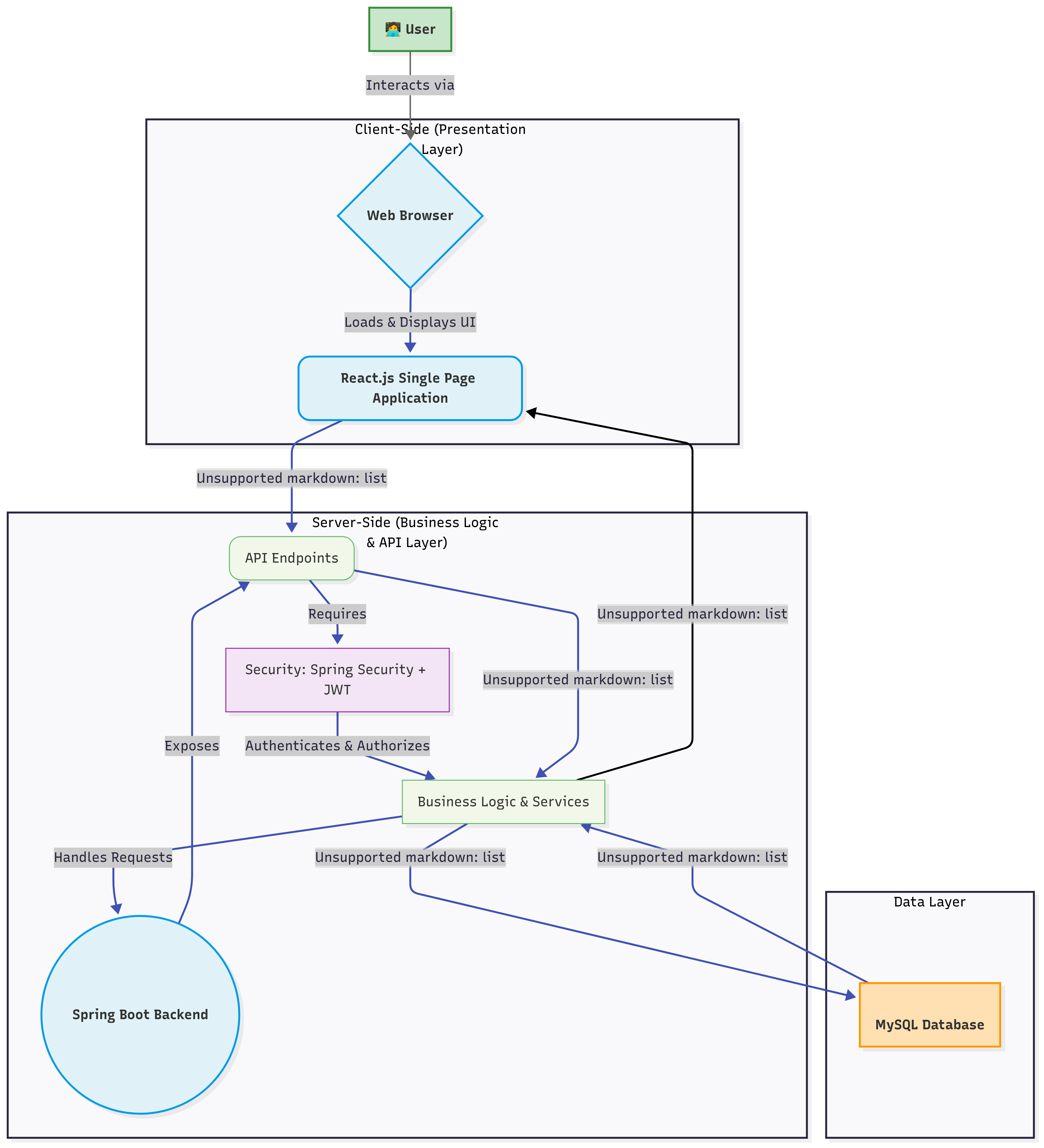
Classic 3-tier layered architecture, with Redis sitting alongside MySQL as a second, purpose-built data store for short-lived state:
Controller (REST API)  →  Service (Business Logic)  →  Repository (JPA / MySQL)
                                    │
                                    └──▶  RedisTemplate  →  Redis  (OTPs, JWT blacklist)
The codebase is organized by domain modules (feature-based packaging), not by layer — keeping related code co-located and the project scalable.
com.ankit.HealthCare_Backend/
├── appointment/          # Appointment booking, status updates, paginated repository queries
├── authentication/       # JWT + Redis blacklist, Redis-backed OTP, OAuth2, Security config
├── billing/              # Billing records, payment, revenue stats, Razorpay integration, paginated billing list
├── communication/        # Contact Us feature
├── core/                 # Shared enums (AppointmentStatus, BillingStatus), Role entity, RedisConfig
├── Exception/            # GlobalExceptionHandler + custom exceptions
├── filemanagement/       # Profile picture upload/retrieval, Cloudinary integration
├── Notification/         # Notification entity & repository
├── prescription/         # Doctor prescriptions, paginated patient-facing query
└── usermanagement/       # Admin, Doctor, Patient, User, Profile sub-modules — paginated list endpoints in Admin/Doctor/Patient controllers


| Component | Technology | Version |
|---|---|---|
| Framework | Spring Boot | 3.5.7 |
| Security | Spring Security + JWT (jjwt) | 6.5.7 / 0.11.5 |
| In-Memory Store | Redis + Spring Data Redis (Lettuce client) | 3.5.7 |
| Social Login | Spring OAuth2 Client (Google) | 6.5.7 |
| Payment Gateway | Razorpay Java SDK | Latest stable |
| Media Storage | Cloudinary Java SDK | Latest stable |
| Spring Boot Starter Mail (JavaMailSender) | 3.5.7 | |
| ORM | Spring Data JPA + Hibernate | 3.5.7 |
| Pagination | Spring Data Pageable / Page<T> |
3.5.7 |
| Database | MySQL (mysql-connector-j) | 8.3.0 |
| Validation | Spring Boot Starter Validation (Jakarta) | 3.5.7 |
| API Docs | SpringDoc OpenAPI (Swagger UI) | 2.5.0 |
| Build | Maven | 3.x |
| Utilities | Lombok | 1.18.32 |
| Language | Java | 17 |
Request → JwtFilter → Redis blacklist check → Validate signature/expiry → Set SecurityContext → @PreAuthorize / hasRole()
- Registration —
POST /api/auth/registerwith full Bean Validation (@Valid) - Login —
POST /api/auth/loginreturns a signed JWT; doctors blocked until approved - Google OAuth2 —
/oauth2/**flow handled byOAuth2LoginSuccessHandler, redirects with token - JWT Filter —
JwtFilterintercepts every request, checks the Redis blacklist first, then validates signature & expiry - Logout / Revocation —
POST /api/auth/logoutblacklists the presented token in Redis for its remaining lifetime (see 🧠 Redis Integration below) - Role Guards —
/api/patient/**→ROLE_PATIENT,/api/doctor/**→ROLE_DOCTOR,/api/admin/**→ROLE_ADMIN,/api/profile/**→ROLE_PATIENTorROLE_DOCTORviahasAnyRole - Email OTP —
POST /api/auth/send-otpsends a 6-digit OTP stored in Redis;POST /api/auth/verify-otpvalidates it before allowing registration - Password Reset — Secure time-limited token flow via
POST /api/auth/forgot-password→POST /api/auth/reset-password - BCrypt — All passwords hashed with
BCryptPasswordEncoder - Payment Signature Verification — Every Razorpay payment is verified server-side via HMAC signature before billing status changes — the client can never self-report a payment as successful
- Credential-Safe CORS —
CorsConfigurationSourceusesallowedOriginPatterns(never a bare"*") so credentialed requests (JWT-bearing) from the frontend are honored without violating the CORS spec
Redis was introduced to solve two problems a relational database handles poorly: data that must expire on its own, and a fast existence check that has to run on every single authenticated request. Both OTPs and the JWT blacklist fit that profile, so both moved off MySQL and onto Redis.
| Problem (before) | Why MySQL was a poor fit | Redis fix |
|---|---|---|
OTPs stored in an email_otps table with an expiryTime column, checked manually on every verify call |
Expiry had to be enforced in application code (expiryTime.isAfter(now)); expired/unverified rows never got cleaned up without a separate scheduled job |
Redis SETEX gives the key a TTL natively — it's simply gone when it expires, no cleanup job needed |
| Stateless JWTs have no logout — the only way to "log out" was to delete the token client-side, while the token itself stayed valid on the server until it naturally expired | JWTs are stateless by design; adding revocation state to MySQL would mean an extra table hit checked on every protected request | A blacklisted token's ID is stored as a Redis key with a TTL equal to its remaining lifetime — an O(1) in-memory lookup on every request, self-cleaning by design |
1. Configuration — core/config/RedisConfig.java defines a single RedisTemplate<String, String> bean (StringRedisSerializer for both key and value, since every value stored is a simple string — an OTP, a "true" flag, or a token marker — not a serialized object).
2. Redis-backed OTP store — authentication/service/EmailOtpService.java
redisTemplate.opsForValue().set(otpKey(email), otp, Duration.ofMinutes(otpExpiryMinutes));
redisTemplate.delete(verifiedKey(email));- Key pattern:
otp:<email>for the OTP itself,otp:verified:<email>for the post-verification flag - Sending a new OTP clears any stale
verifiedflag from a prior attempt, so a resend always requires verifying the new code — the account can't be created off the back of an old, already-consumed verification verifyOtp()deletes the OTP key on successful match (one-time use) and sets theverifiedflag with a slightly longer TTL than the OTP itself, giving the user a window to finish the registration form after verifying without needing to re-verify
3. Redis-backed JWT blacklist / logout — authentication/security/JwtService.java
public void blacklistToken(String token) {
    long remainingMs = getExpirationFromToken(token).getTime() - System.currentTimeMillis();
    if (remainingMs > 0) {
        redisTemplate.opsForValue().set("blacklist:" + token, "true", Duration.ofMillis(remainingMs));
    }
}

public boolean isTokenBlacklisted(String token) {
    return Boolean.TRUE.equals(redisTemplate.hasKey("blacklist:" + token));
}
POST /api/auth/logoutcallsblacklistToken(), keyed by the token itself, with a TTL set to exactly the token's remaining lifetime — once it would have expired naturally anyway, Redis discards the key on its own, so the blacklist never accumulates stale entriesJwtFilterchecksisTokenBlacklisted()before signature/expiry validation on every request — a logged-out token is rejected immediately with401, even if it hasn't reached its original expiry time
- Logout is now a real, server-enforced action, not just a client-side
localStorageclear — a captured or leaked token stops working the moment the legitimate user logs out - OTP expiry and cleanup are handled entirely by Redis's own TTL mechanism — zero custom expiry-checking or scheduled-cleanup code left in the OTP service
- Both features run as simple key/value operations (
SET,GET,DEL,EXISTSwith TTL) — no Redis data structures beyond strings were needed for either use case
| Feature | Redis Key Pattern | TTL | Backing Class |
|---|---|---|---|
| OTP verification | otp:<email> |
app.otp.expiry-minutes (default 10) |
EmailOtpService |
| Post-verify flag | otp:verified:<email> |
OTP expiry + 15 minutes | EmailOtpService |
| JWT logout/blacklist | blacklist:<jwt> |
Exactly the token's remaining lifetime | JwtService / checked in JwtFilter |
Profile pictures for both Patients and Doctors are uploaded directly to Cloudinary rather than local disk — meaning the API remains stateless and horizontally scalable (no shared filesystem needed across instances), and images are served from Cloudinary's CDN.
| Capability | Status |
|---|---|
Multipart image upload (multipart/form-data) |
✅ Implemented |
Content-type validation — only image/* accepted |
✅ Implemented |
| File size validation — 5MB max, rejected before upload | ✅ Implemented |
| Direct stream-to-Cloudinary upload (no local temp storage) | ✅ Implemented |
Role-aware persistence — updates Patient or Doctor entity based on logged-in user's role |
✅ Implemented |
| Returns CDN-backed image URL in response for immediate frontend use | ✅ Implemented |
1. Client sends multipart request  ──▶  POST /api/profile/upload-image  (field: profilePicture)
2. JwtFilter authenticates          ──▶  Principal resolved to logged-in user
3. ProfileService validates file    ──▶  content-type check + 5MB size check
4. CloudinaryService.uploadImage()  ──▶  streams file directly to Cloudinary, returns secure URL
5. Service resolves role            ──▶  PATIENT → Patient entity, DOCTOR → Doctor entity
6. profilePicture column updated    ──▶  persisted via @Transactional save
7. Response                         ──▶  { success, message, imageUrl }
Because the upload is wrapped in @Transactional, a failure at any stage (invalid file, Cloudinary error, DB save error) rolls back cleanly rather than leaving a partially-updated profile.
Every list-returning endpoint that can grow unbounded — doctors, patients, appointments, prescriptions, and billing records — is backed by Spring Data Pageable instead of returning a full, unbounded List<T>. This keeps response payloads small and predictable regardless of how much data accumulates in production.
| Capability | Status |
|---|---|
page / size query params accepted on all major list endpoints |
✅ Implemented |
Responses shaped as Spring Data Page<T> (content, totalElements, totalPages, number, …) |
✅ Implemented |
Database-level pagination via repository.findAll(Pageable) / derived paginated query methods |
✅ Implemented |
| Role-scoped paginated queries (e.g. a patient's own appointments/prescriptions only) | ✅ Implemented |
Sensible defaults (page=0, size=10) when query params are omitted |
✅ Implemented |
| Panel | Endpoint | Paginated Query |
|---|---|---|
| Admin | GET /api/admin/doctors |
DoctorRepository.findAll(Pageable) |
| Admin | GET /api/admin/patients |
PatientRepository.findAll(Pageable) |
| Admin | GET /api/admin/billing |
BillingRepository.findAllWithDetails(Pageable) |
| Doctor | GET /api/doctor/appointments/my |
AppointmentRepository.findByDoctorId(Long, Pageable) |
| Doctor | GET /api/doctor/patients |
Paginated derivation from the doctor's own appointment records |
| Patient | GET /api/patient/doctors |
DoctorRepository.findByIsApproved(boolean, Pageable) |
| Patient | GET /api/patient/appointments/my |
AppointmentRepository.findByPatientId(Long, Pageable) |
| Patient | GET /api/patient/prescriptions |
PrescriptionRepository.findByAppointment_Patient_Id(Long, Pageable) |
{
  "content": [ { "id": 1, "firstName": "Ankit", "lastName": "Kumar Gurjar", "...": "..." } ],
  "totalElements": 42,
  "totalPages": 5,
  "number": 0,
  "size": 10,
  "first": true,
  "last": false,
  "numberOfElements": 10,
  "empty": false
}
Pagination is handled entirely at the query level (Pageable pushed down into the repository), not by fetching a full table and slicing it in memory — so performance stays consistent as row counts grow.
The billing module integrates Razorpay end-to-end for appointment payments — not a mocked checkout, but a real gateway integration with proper order lifecycle and server-side trust boundaries.
| Capability | Status |
|---|---|
Order creation via backend (POST /api/patient/payments/create-order) |
✅ Implemented |
| Razorpay Checkout (UPI, Cards, Netbanking) | ✅ Implemented |
| Server-side payment signature verification (HMAC-SHA256) | ✅ Implemented |
Real-time billing status sync (UNPAID → PAID) |
✅ Implemented |
| Payment failure & checkout-dismissal handling | ✅ Implemented |
| Revenue reporting (daily / monthly) | ✅ Implemented |
A naive integration trusts the frontend to say "payment succeeded." This one doesn't. The flow is:
1. Frontend requests an order  ──▶  Backend calls Razorpay Orders API, returns order_id
2. Razorpay Checkout opens     ──▶  User pays via UPI / Card / Netbanking
3. Razorpay returns            ──▶  payment_id, order_id, signature  (to frontend)
4. Frontend forwards these     ──▶  Backend verification endpoint
5. Backend recomputes HMAC     ──▶  using Razorpay key secret
6. Only on signature match     ──▶  Billing status flips to PAID
This is the same trust model used by real fintech and healthtech platforms — the backend is the single source of truth for what counts as a successful payment, never the client.
Razorpay's Test Mode sandbox reproduces the entire checkout, OTP, and verification flow with zero real money movement — used to validate this integration end-to-end.
Card Payment
| Field | Test Value |
|---|---|
| Card Number | 4111 1111 1111 1111 (Visa) or 5267 3181 8797 5449 (Mastercard) |
| Expiry (MM/YY) | Any future date — e.g. 12/30 |
| CVV | Any 3 digits — e.g. 123 |
| Cardholder Name | Any name |
| OTP | Any 4–10 digit number — e.g. 1234 |
Select Success on Razorpay's mock bank page to complete the simulated transaction, or use card 4000 0000 0000 0002 and select Failure to test the failure path.
UPI Payment
| Field | Test Value |
|---|---|
| UPI ID | success@razorpay |
No need to scan the on-screen QR with a real device — that only resolves against live, NPCI-registered transactions. Entering the test UPI ID simulates an instant successful payment in sandbox mode.
Going live requires only swapping the test key (rzp_test_...) for a live key (rzp_live_...) post KYC/activation on Razorpay's dashboard — no changes to the integration logic itself.
A single @RestControllerAdvice class handles all error scenarios and returns a consistent JSON error envelope:
{
  "timestamp": "2025-10-27T14:32:10.123",
  "status": 404,
  "message": "Doctor with id 5 not found"
}| Exception | HTTP Status |
|---|---|
ResourceNotFoundException |
404 Not Found |
DuplicateResourceException |
409 Conflict |
UnauthorizedException |
401 Unauthorized |
IllegalArgumentException |
400 Bad Request |
MethodArgumentNotValidException |
400 Bad Request (validation errors) |
PaymentVerificationException |
400 Bad Request (Razorpay signature mismatch) |
Exception (fallback) |
500 Internal Server Error |
All incoming request DTOs are validated with Jakarta Bean Validation annotations before reaching the service layer:
// RegisterRequestDTO example
@NotNull @NotBlank @Email        private String email;
@NotNull @NotBlank               private String password;
@Digits(integer=10, fraction=0)  private Long contactNumber;

// AppointmentDTO example
@NotNull  private Long patientId;
@NotNull  private Long doctorId;
@NotNull  private LocalDate appointmentDate;

// PaymentVerificationDTO example
@NotNull @NotBlank  private String razorpayOrderId;
@NotNull @NotBlank  private String razorpayPaymentId;
@NotNull @NotBlank  private String razorpaySignature;
@NotNull             private Long appointmentId;
Validation failures are caught by the Global Exception Handler and returned as structured 400 Bad Request responses.
📄 Endpoints marked (Paginated) accept optional
page(default0) andsize(default10) query params and return a Spring DataPage<T>— see 📄 Server-Side Pagination above for the response shape.
| Method | Endpoint | Description | Auth |
|---|---|---|---|
| POST | /send-otp |
Send 6-digit OTP to email, stored in Redis | Public |
| POST | /verify-otp |
Verify the Redis-stored OTP before registration | Public |
| POST | /register |
Register a new user (Patient/Doctor) | Public |
| POST | /login |
Authenticate and receive JWT | Public |
| POST | /logout |
Blacklist the current JWT in Redis, invalidating it immediately | Authenticated |
| POST | /forgot-password |
Request a password reset token | Public |
| POST | /reset-password |
Reset password using token | Public |
| GET | /oauth2/callback |
Google OAuth2 redirect handler | Public |
| Method | Endpoint | Description |
|---|---|---|
| GET | /doctors |
Browse all approved doctors (Paginated) |
| POST | /appointments/new |
Book a new appointment |
| GET | /appointments/my |
View personal appointment history (Paginated) |
| DELETE | /appointments/{id}/cancel |
Cancel an appointment |
| PUT | /appointments/{id}/pay |
Make payment for an appointment |
| POST | /payments/create-order |
Create a Razorpay order for an appointment |
| POST | /payments/verify |
Verify Razorpay payment signature and mark billing as PAID |
| GET | /prescriptions |
View personal prescriptions (Paginated) |
| GET | /profile |
View own patient profile (includes profilePicture URL) |
| Method | Endpoint | Description |
|---|---|---|
| GET | /profile |
View own doctor profile (includes profilePicture URL) |
| GET | /appointments/my |
View all own appointments (Paginated) |
| PUT | /appointments/{id}/status |
Update appointment status (triggers in-app + email notifications) |
| GET | /patients |
View all own patients (Paginated) |
| POST | /prescription |
Create a prescription |
| GET | /prescriptions |
View all own prescriptions |
| Method | Endpoint | Description |
|---|---|---|
| POST | /upload-image |
Upload a profile picture (multipart/form-data, field: profilePicture) — validated, streamed to Cloudinary, and linked to the caller's Patient or Doctor record |
| DELETE | /delete-image |
Remove the current profile picture |
| Method | Endpoint | Description |
|---|---|---|
| GET | /doctors |
Get all doctors (including pending) (Paginated) |
| PUT | /doctors/{id}/approve |
Approve a doctor |
| PUT | /doctors/{id}/reject |
Reject / revoke a doctor |
| GET | /patients |
Get all patients (Paginated) |
| GET | /billing |
View all billing records (Paginated) |
| PUT | /billing/{id}/status |
Update a billing record's status |
| GET | /revenue/daily |
Get today's total revenue |
| GET | /revenue/monthly |
Get current month's total revenue |
| Method | Endpoint | Description |
|---|---|---|
| GET | /my |
Get all notifications for logged-in user (newest first) |
| GET | /unread-count |
Get count of unread notifications (for UI badge) |
| PUT | /{id}/read |
Mark a specific notification as read |
| PUT | /mark-all-read |
Mark all unread notifications as read |

Core entities: User, Role, Patient, Doctor, Admin, Appointment, Prescription, Billing, ContactUs, Notification, PasswordResetToken
Billing stores the Razorpay orderId, paymentId, and status (UNPAID / PAID) per appointment, giving a full payment audit trail per record.
Patient and Doctor each store a profilePicture column holding the Cloudinary-hosted CDN URL of the user's uploaded profile image.
Note: OTPs and the JWT blacklist are intentionally not part of this relational schema — they live in Redis as short-lived keys, not MySQL rows, since neither needs to survive past its own expiry.
Once running, the interactive Swagger UI is available at:
http://localhost:8080/swagger-ui/index.html
Paginated endpoints are documented with their page/size query parameters directly in Swagger's interactive "Try it out" panel.
- Java 17+
- Maven 3.x
- MySQL 8.x
- Redis 7.x (local install, or a managed free tier such as Upstash/Redis Cloud)
- A Razorpay account (Test Mode keys are free — no business verification needed to start testing)
- A Cloudinary account (free tier is sufficient for development)
git clone https://github.com/ankitdoi-coder/healthcare-backend.git
cd healthcare-backend
Create the database:
CREATE DATABASE healthcaredb;Confirm Redis is reachable:
redis-cli ping
# should return: PONG
Configure src/main/resources/application.properties:
spring.datasource.url=${DB_URL}
spring.datasource.username=${DB_USERNAME}
spring.datasource.password=${DB_PASSWORD}
spring.data.redis.host=${REDIS_HOST:localhost}
spring.data.redis.port=${REDIS_PORT:6379}
spring.data.redis.password=${REDIS_PASSWORD:}
app.jwt.secret=${JWT_SECRET}
app.jwt.expiration=${JWT_EXPIRATION_MS}
razorpay.key.id=${RAZORPAY_KEY_ID}
razorpay.key.secret=${RAZORPAY_KEY_SECRET}
cloudinary.cloud-name=${CLOUDINARY_CLOUD_NAME}
cloudinary.api-key=${CLOUDINARY_API_KEY}
cloudinary.api-secret=${CLOUDINARY_API_SECRET}
Run:
mvn spring-boot:runServer starts at http://localhost:8080
| Variable | Description | Example |
|---|---|---|
DB_URL |
JDBC connection URL | jdbc:mysql://localhost:3306/healthcaredb |
DB_USERNAME |
Database username | root |
DB_PASSWORD |
Database password | your_password |
REDIS_HOST |
Redis host | localhost |
REDIS_PORT |
Redis port | 6379 |
REDIS_PASSWORD |
Redis password (blank for local dev) | (empty) |
JWT_SECRET |
Secret key for signing JWTs | a-very-long-random-secret-key |
JWT_EXPIRATION_MS |
Token TTL in milliseconds | 86400000 (24h) |
RAZORPAY_KEY_ID |
Razorpay API Key ID (test or live) | rzp_test_xxxxxxxxxxxx |
RAZORPAY_KEY_SECRET |
Razorpay API Key Secret (test or live) | your_razorpay_key_secret |
CLOUDINARY_CLOUD_NAME |
Cloudinary account cloud name | your_cloud_name |
CLOUDINARY_API_KEY |
Cloudinary API key | 123456789012345 |
CLOUDINARY_API_SECRET |
Cloudinary API secret | your_cloudinary_secret |
The system sends dual-channel notifications (in-app + email) for all key appointment events. Notifications include appointment time and reason details for full context.
When a patient books an appointment:
In-App Notification (stored in database)
- Sent to: Patient & Doctor
- Message: "Your Appointment Booked with Doctor: [Name]" (Patient) / "You have new Appointment from Patient: [Name]" (Doctor)
- Type:
APPOINTMENT - Read/Unread tracking enabled
Email Notification (via JavaMailSender)
- Patient receives: Appointment confirmation with doctor name, date, and gratitude message
- Doctor receives: Appointment alert with patient name, scheduled date, and dashboard reminder
- Both emails include appointment time (
LocalTime) and reason for visit details
When a doctor updates the appointment status (SCHEDULED → COMPLETED / CANCELED, etc.):
In-App Notification (to patient)
- Message: "Your appointment status has been updated to: [STATUS] by Dr. [Name]"
- Type:
APPOINTMENT
Email Notification (to patient)
- Subject: "Appointment Status Update"
- Contains: Appointment date, doctor name, new status, and dashboard link
Patients and doctors can:
- Retrieve all notifications sorted by creation date (newest first)
- Check unread notification count (for UI bell badge)
- Mark individual notifications as read
- Mark all notifications as read in one call
APPOINTMENT— Appointment booking and status changesPRESCRIPTION— Prescription-related (extensible for future use)PAYMENT— Payment status updates (extensible for future use)REGISTRATION— Account registration events (extensible for future use)
This project was built to demonstrate practical, production-grade backend engineering rather than tutorial-level CRUD:
- 🧠 Redis used for the right reasons, not for its own sake — introduced specifically for self-expiring data (OTPs) and a revocation check that has to run on every request (JWT blacklist), rather than caching data that didn't need it.
- 🔐 Security-first payment handling — billing status is never trusted from the client; it's gated behind server-side HMAC signature verification, mirroring real fintech/healthtech systems.
- 🚪 Real logout for stateless JWTs — a token can be revoked before its natural expiry, closing the gap that pure client-side logout leaves open.
- ☁️ Stateless media handling — profile pictures stream directly to Cloudinary rather than local disk, keeping the API instance-agnostic and production-portable from day one.
- 📄 Query-level pagination, not in-memory slicing — every list endpoint that can grow unbounded pushes
Pageabledown into the repository layer, so response times stay flat as data volume grows instead of degrading with a full-table fetch. - 🪪 Stateless, role-scoped JWT auth with a proper OAuth2 social login path alongside it.
- 🧩 Consistent error contracts across the entire API via a single global exception handler.
- 🏗️ Domain-driven package structure that scales cleanly as features are added, rather than a flat MVC layout.
- 🔗 Real third-party integration experience with Razorpay's order lifecycle (create → checkout → verify) and Cloudinary's upload API — not simulated or mocked integrations.
- 🎥 Documented engineering process — video walkthroughs above show real debugging and design decisions, not just polished final output.
