A responsive virtual drum machine emulator built originally as a certification project for the freeCodeCamp Front End Development Libraries curriculum.
Play and experience 3 iconic Roland drum kits (TR-707, TR-808, and TR-909) directly in your browser using your mouse or keyboard triggers.
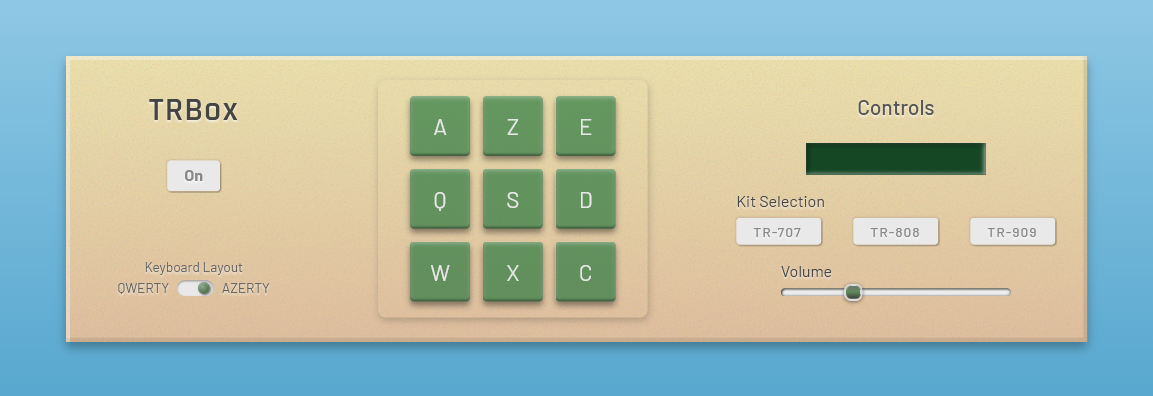
This interactive web audio application replicates the core feel of classic hardware sequencers with a strong emphasis on modern UI/UX design:
- Multi-Kit Selector: Switch instantly between high-quality audio samples from the legendary Roland TR-707, TR-808, and TR-909.
- Keyboard Layout Switch Choose between QWERTY or AZERTY keyboard to better handle the TRBox.
- Dynamic Controls: Fully functional Power On/Off switch, master Volume control slider, and a responsive digital LCD display tracking your actions.
- Interactive Drum Pads: 9 velocity-styled clickable pads with CSS glow animations, fully mapped to keyboard shortcuts.
- Responsive Layout: Designed from scratch using modern CSS layouts (Grid and Flexbox) to ensure usability across mobile, tablet, and desktop screens.
- HTML5: Semantic markup focused on web accessibility (a11y) and keyboard navigation.
- CSS3: Custom UI design, responsive layout, fluid transitions, and button animations.
- JavaScript (ES6+): Pure Vanilla JS managing the application logic, DOM manipulation, localStorage, keydown event listeners, and audio playback.
- Web Audio API: High-fidelity browser audio rendering for low-latency sound triggers and normalized volume on kits.
If you want to run this project locally on your machine:
- Clone the repository:
git clone https://github.com/am-spark/Drum-Machine-Javascript.git- Navigate into the project folder:
cd Drum-Machine-Javascript- Open index.html in your favorite browser.
- Audio Samples: Sourced from the Drum Machine Archive.
- Course Provider: freeCodeCamp (Front End Libraries Certification).
- am-spark - GitHub Profile