Turn GitHub Issues into structured, AI-powered implementation plans — instantly.





Demo · How it Works · Architecture · Project Structure · Getting Started
RootIssue is a web application that reads a GitHub issue URL you paste in, intelligently identifies the most relevant source files in the repository, and uses a two-stage AI pipeline to generate a clean, focused Markdown implementation plan — right in your browser.
No context switching. No manual digging. Just paste a GitHub issue URL and click Generate Plan.
You can bring your own API key (Google, OpenAI, or Anthropic) or use the 3 built-in free credits powered by the backend's own Gemini key.
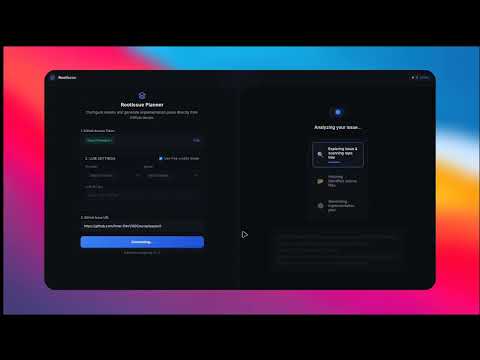
Click the image above to watch the full video.
The generation pipeline runs in four sequential stages, coordinated between the React frontend and the Hono API backend:
User pastes a GitHub Issue URL
        │
        ▼
┌──────────────────────────────────────────────────────────────────────┐
│                        React Web App (Vite)                          │
│                                                                      │
│  0. First-time Setup                                                 │
│     ├─ Enter GitHub Access Token (required)                          │
│     ├─ Choose LLM mode:                                              │
│     │     Option A: Free credits mode (3 tries, Google/Gemini)       │
│     │     Option B: Custom — select provider, model, enter API key   │
│     └─ Settings saved to localStorage                                │
│                                                                      │
│  1. Issue Resolution                                                  │
│     ├─ Parse owner/repo/issue# from the pasted URL                   │
│     ├─ Fetch issue title + body via GitHub API                       │
│     └─ Fetch full file tree of the repository                        │
│                                                                      │
│  2. Explore (Stage 1 API call)                                       │
│     └─ POST /explore-tree → {issue, context, provider, model}        │
│          ExplorerLLM returns ≤5 relevant file paths                  │
│                                                                      │
│  3. Fetch File Contents                                               │
│     └─ Fetch content of each identified file from GitHub API         │
│                                                                      │
│  4. Plan Generation (Stage 2 API call)                               │
│     └─ POST /generate-plan → {issue, filesContent, provider, model}  │
│          PlannerLLM returns a Markdown implementation plan            │
│                                                                      │
│  5. Display                                                           │
│     ├─ Render the Markdown plan on the right panel                   │
│     └─ Deduct 1 credit (if using free credits mode)                  │
└──────────────────────────────────────────────────────────────────────┘
        │  header: { api-key: "" }                │
        │  body: { issue, context, provider, model }
        ▼                                         ▼
┌─────────────────────────────────────────────────────┐
│                    Hono API (Edge)                   │
│                                                      │
│  POST /api/v1/explore-tree                           │
│  ├─ Validate api-key header                          │
│  ├─ Validate body: provider, model required          │
│  └─ ExplorerLLM: return ≤5 relevant file paths       │
│                                                      │
│  POST /api/v1/generate-plan                          │
│  ├─ Validate api-key header                          │
│  ├─ Validate body: provider, model required          │
│  └─ PlannerLLM: generate Markdown plan               │
│                                                      │
│  GET /api/v1/fetch-models/:provider                  │
│  └─ Return live model list for the given provider    │
│                                                      │
│  ⚡ Runtime: Cloudflare Workers                      │
└─────────────────────────────────────────────────────┘

| Stage | Role | Input | Output |
|---|---|---|---|
| ExplorerLLM | File targeting | Issue text + full repo file tree | Up to 5 relevant file paths |
| PlannerLLM | Plan generation | Issue text + content of identified files | Markdown implementation plan |
The provider and model are selected by the user and passed in every request body. The backend dynamically initialises the correct SDK:
| Provider | SDK |
|---|---|
google |
@langchain/google-genai |
openai |
@langchain/openai |
anthropic |
@langchain/anthropic |
If the user does not provide their own API key, the backend falls back to the built-in Gemini key (VITE_GEMINI_API_KEY in the frontend env). Users receive 3 free tries. The provider/model selection dropdowns are disabled in this mode.
RootIssue/
├── api/                              # Hono API (Cloudflare Workers)
│   └── src/
│       ├── index.ts                  # CORS config + route definitions
│       ├── controllers/
│       │   └── planController.ts     # Request handlers (validate, delegate)
│       ├── services/
│       │   └── planService.ts        # ExplorerLLM + PlannerLLM orchestration
│       │                             # Also serves GET /fetch-models/:provider
│       ├── ai/                       # LLM prompt templates
│       ├── utils/
│       │   └── SetupLLM.ts           # Dynamic LLM factory (google/openai/anthropic)
│       └── types/
│           └── index.ts              # Shared type definitions (IExplorerBody, etc.)
│
└── ui/                               # React Web App (Vite)
    └── src/
        ├── App.tsx                   # Main state machine + plan generation flow
        ├── main.tsx                  # Entry point
        ├── style.css                 # Global design system
        ├── types.ts                  # Frontend type definitions
        ├── components/
        │   ├── views/
        │   │   ├── ConfigPanel.tsx   # Settings: GitHub token, provider, model, API key
        │   │   ├── LoadingView.tsx   # Step-by-step progress UI (steps 1–3)
        │   │   ├── ResultView.tsx    # Renders the Markdown plan
        │   │   └── ErrorView.tsx     # Contextual error messages + retry
        │   ├── Header.tsx            # App header + credits badge
        │   ├── Footer.tsx
        │   ├── IssueContextCard.tsx
        │   └── MarkdownViewer.tsx    # react-markdown + remark-gfm renderer
        ├── services/
        │   ├── index.ts              # API client: SendToExplorerLLM, SendToPlannerLLM
        │   └── github.ts             # GitHub API: issues, repo tree, file content
        └── utils/
            └── storage.ts            # localStorage helpers + UserSettings type
- Node.js ≥ 18 / Bun
- A Gemini / OpenAI / Anthropic API Key (optional — only needed if not using free credits)
- A GitHub Personal Access Token (for reading private repos or avoiding rate limits)
- A Cloudflare account (for deploying the Workers API)
cd api
bun install          # or: npm install
Create a .dev.vars file in api/:
GEMINI_API_KEY=your_gemini_key_used_as_fallback_for_free_creditsThe API key set here acts as the backend fallback for users in free credits mode. Users who bring their own key pass it via the
api-keyrequest header.
Run locally:
bun run dev # Starts at http://localhost:8787cd ui
npm install # or: bun installCreate a .env file in ui/:
VITE_BACKEND_URL=http://localhost:8787/api/v1
VITE_GEMINI_API_KEY=your_gemini_key_for_free_credits_mode
VITE_GEMINI_API_KEYis the key sent in theapi-keyheader when the user is in free credits mode (no personal API key provided). It must match what the backend has configured.
Run the dev server:
npm run dev # Starts at http://localhost:5173- Open
http://localhost:5173in your browser - Enter your GitHub Access Token and click Save
- Choose your LLM mode:
- Free credits mode (default): uses the built-in Gemini key — 3 free tries
- Custom mode: uncheck "Use free credits mode", select a provider + model, and enter your API key
- Paste a GitHub Issue URL (e.g.
https://github.com/owner/repo/issues/42) - Click Generate Plan and wait for the three-stage pipeline to complete
- Read, copy, or regenerate the Markdown implementation plan
| Method | Endpoint | Auth Header | Description |
|---|---|---|---|
POST |
/api/v1/explore-tree |
api-key: <key> |
Stage 1: identify relevant files from the repo tree |
POST |
/api/v1/generate-plan |
api-key: <key> |
Stage 2: generate the Markdown implementation plan |
GET |
/api/v1/fetch-models/:provider |
— | Returns the live model list for google, openai, or anthropic |
GET |
/h |
— | Health check |
POST body shape (both endpoints):
{
  "issue": "Full issue text (title + body)",
  "context": "Repo file tree string",
  "provider": "google | openai | anthropic",
  "model": "model-name"
}MIT — see LICENSE for details.